在渗透测试和网络安全领域,自动补全功能可以极大地提升效率和体验。尤其是在命令行环境下,手动输入复杂命令和参数可能导致频繁出错或效率低下。幸运的是,gobuster 提供了一个名为 completion 的子命令,可为不同的 shell 环境生成自动补全配置文件。在本教程中,我们将重点介绍 completion 子命令的用法,并详细讲解如何在 Zsh 环境中启用自动补全,让你的操作更快、更精准!
一、completion 子命令的作用
completion 子命令的主要功能是为 gobuster 生成适合当前 shell 环境的自动补全脚本。通过加载这些脚本,可以实现以下功能:
- 参数补全:自动补全
gobuster的所有子命令和选项。 - 动态补全:根据当前上下文动态生成可用参数或路径。
- 减少错误:避免手动输入时出现拼写或格式错误。
支持的 Shell 环境包括:
- Bash
- Zsh
- Fish
二、在 Zsh 中启用 gobuster 自动补全
下面是一步步在 Zsh 环境中配置 gobuster 自动补全的流程:
1. 生成自动补全脚本
运行以下命令生成 Zsh 的自动补全脚本:
sudo gobuster completion zsh输出的内容类似如下:
#compdef gobuster
compdef _gobuster gobuster

# zsh completion for gobuster                             -*- shell-script -*-

__gobuster_debug()
{
    local file="$BASH_COMP_DEBUG_FILE"
    if [[ -n ${file} ]]; then
        echo "$*" >> "${file}"
    fi
}

_gobuster()
{
    local shellCompDirectiveError=1
    local shellCompDirectiveNoSpace=2
    local shellCompDirectiveNoFileComp=4
    local shellCompDirectiveFilterFileExt=8
    local shellCompDirectiveFilterDirs=16
    local shellCompDirectiveKeepOrder=32

    local lastParam lastChar flagPrefix requestComp out directive comp lastComp noSpace keepOrder
    local -a completions

    __gobuster_debug "\n========= starting completion logic =========="
    __gobuster_debug "CURRENT: ${CURRENT}, words[*]: ${words[*]}"

    # The user could have moved the cursor backwards on the command-line.
    # We need to trigger completion from the $CURRENT location, so we need
    # to truncate the command-line ($words) up to the $CURRENT location.
    # (We cannot use $CURSOR as its value does not work when a command is an alias.)
    words=("${=words[1,CURRENT]}")
    __gobuster_debug "Truncated words[*]: ${words[*]},"

    lastParam=${words[-1]}
    lastChar=${lastParam[-1]}
    __gobuster_debug "lastParam: ${lastParam}, lastChar: ${lastChar}"

    # For zsh, when completing a flag with an = (e.g., gobuster -n=<TAB>)
    # completions must be prefixed with the flag
    setopt local_options BASH_REMATCH
    if [[ "${lastParam}" =~ '-.*=' ]]; then
        # We are dealing with a flag with an =
        flagPrefix="-P ${BASH_REMATCH}"
    fi

    # Prepare the command to obtain completions
    requestComp="${words[1]} __complete ${words[2,-1]}"
    if [ "${lastChar}" = "" ]; then
        # If the last parameter is complete (there is a space following it)
        # We add an extra empty parameter so we can indicate this to the go completion code.
        __gobuster_debug "Adding extra empty parameter"
        requestComp="${requestComp} \"\""
    fi

    __gobuster_debug "About to call: eval ${requestComp}"

    # Use eval to handle any environment variables and such
    out=$(eval ${requestComp} 2>/dev/null)
    __gobuster_debug "completion output: ${out}"

    # Extract the directive integer following a : from the last line
    local lastLine
    while IFS='\n' read -r line; do
        lastLine=${line}
    done < <(printf "%s\n" "${out[@]}")
    __gobuster_debug "last line: ${lastLine}"

    if [ "${lastLine[1]}" = : ]; then
        directive=${lastLine[2,-1]}
        # Remove the directive including the : and the newline
        local suffix
        (( suffix=${#lastLine}+2))
        out=${out[1,-$suffix]}
    else
        # There is no directive specified.  Leave $out as is.
        __gobuster_debug "No directive found.  Setting do default"
        directive=0
    fi

    __gobuster_debug "directive: ${directive}"
    __gobuster_debug "completions: ${out}"
    __gobuster_debug "flagPrefix: ${flagPrefix}"

    if [ $((directive & shellCompDirectiveError)) -ne 0 ]; then
        __gobuster_debug "Completion received error. Ignoring completions."
        return
    fi

    local activeHelpMarker="_activeHelp_ "
    local endIndex=${#activeHelpMarker}
    local startIndex=$((${#activeHelpMarker}+1))
    local hasActiveHelp=0
    while IFS='\n' read -r comp; do
        # Check if this is an activeHelp statement (i.e., prefixed with $activeHelpMarker)
        if [ "${comp[1,$endIndex]}" = "$activeHelpMarker" ];then
            __gobuster_debug "ActiveHelp found: $comp"
            comp="${comp[$startIndex,-1]}"
            if [ -n "$comp" ]; then
                compadd -x "${comp}"
                __gobuster_debug "ActiveHelp will need delimiter"
                hasActiveHelp=1
            fi

            continue
        fi

        if [ -n "$comp" ]; then
            # If requested, completions are returned with a description.
            # The description is preceded by a TAB character.
            # For zsh's _describe, we need to use a : instead of a TAB.
            # We first need to escape any : as part of the completion itself.
            comp=${comp//:/\\:}

            local tab="$(printf '\t')"
            comp=${comp//$tab/:}

            __gobuster_debug "Adding completion: ${comp}"
            completions+=${comp}
            lastComp=$comp
        fi
    done < <(printf "%s\n" "${out[@]}")

    # Add a delimiter after the activeHelp statements, but only if:
    # - there are completions following the activeHelp statements, or
    # - file completion will be performed (so there will be choices after the activeHelp)
    if [ $hasActiveHelp -eq 1 ]; then
        if [ ${#completions} -ne 0 ] || [ $((directive & shellCompDirectiveNoFileComp)) -eq 0 ]; then
            __gobuster_debug "Adding activeHelp delimiter"
            compadd -x "--"
            hasActiveHelp=0
        fi
    fi

    if [ $((directive & shellCompDirectiveNoSpace)) -ne 0 ]; then
        __gobuster_debug "Activating nospace."
        noSpace="-S ''"
    fi

    if [ $((directive & shellCompDirectiveKeepOrder)) -ne 0 ]; then
        __gobuster_debug "Activating keep order."
        keepOrder="-V"
    fi

    if [ $((directive & shellCompDirectiveFilterFileExt)) -ne 0 ]; then
        # File extension filtering
        local filteringCmd
        filteringCmd='_files'
        for filter in ${completions[@]}; do
            if [ ${filter[1]} != '*' ]; then
                # zsh requires a glob pattern to do file filtering
                filter="\*.$filter"
            fi
            filteringCmd+=" -g $filter"
        done
        filteringCmd+=" ${flagPrefix}"

        __gobuster_debug "File filtering command: $filteringCmd"
        _arguments '*:filename:'"$filteringCmd"
    elif [ $((directive & shellCompDirectiveFilterDirs)) -ne 0 ]; then
        # File completion for directories only
        local subdir
        subdir="${completions[1]}"
        if [ -n "$subdir" ]; then
            __gobuster_debug "Listing directories in $subdir"
            pushd "${subdir}" >/dev/null 2>&1
        else
            __gobuster_debug "Listing directories in ."
        fi

        local result
        _arguments '*:dirname:_files -/'" ${flagPrefix}"
        result=$?
        if [ -n "$subdir" ]; then
            popd >/dev/null 2>&1
        fi
        return $result
    else
        __gobuster_debug "Calling _describe"
        if eval _describe $keepOrder "completions" completions $flagPrefix $noSpace; then
            __gobuster_debug "_describe found some completions"

            # Return the success of having called _describe
            return 0
        else
            __gobuster_debug "_describe did not find completions."
            __gobuster_debug "Checking if we should do file completion."
            if [ $((directive & shellCompDirectiveNoFileComp)) -ne 0 ]; then
                __gobuster_debug "deactivating file completion"

                # We must return an error code here to let zsh know that there were no
                # completions found by _describe; this is what will trigger other
                # matching algorithms to attempt to find completions.
                # For example zsh can match letters in the middle of words.
                return 1
            else
                # Perform file completion
                __gobuster_debug "Activating file completion"

                # We must return the result of this command, so it must be the
                # last command, or else we must store its result to return it.
                _arguments '*:filename:_files'" ${flagPrefix}"
            fi
        fi
    fi
}

# don't run the completion function when being source-ed or eval-ed
if [ "$funcstack[1]" = "_gobuster" ]; then
    _gobuster
fi

}
这些脚本定义了如何补全命令和参数,例如子命令、选项(如 -u、-w)以及自定义值。
2. 将脚本添加到 Zsh 配置文件
为了让 Zsh 每次启动时都加载补全脚本,可以将生成的内容追加到 Zsh 的配置文件(~/.zshrc)中。直接执行以下命令:
sudo gobuster completion zsh >> ~/.zshrc3. 重新加载 Zsh 配置文件
执行以下命令,使新的配置立即生效:
source ~/.zshrc三、验证自动补全功能
配置完成后,在命令行中尝试输入以下命令并按下 Tab 键,验证补全功能是否正常:
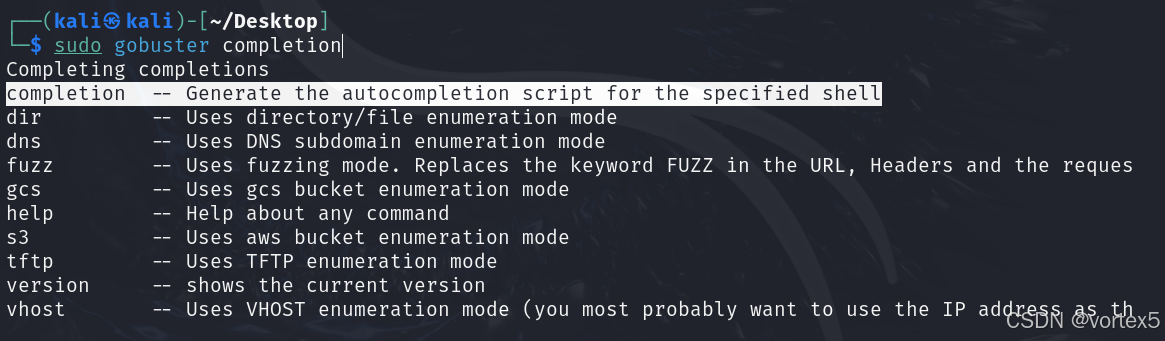
1. 补全子命令
gobuster [Tab]会提示可用的子命令,如下图:
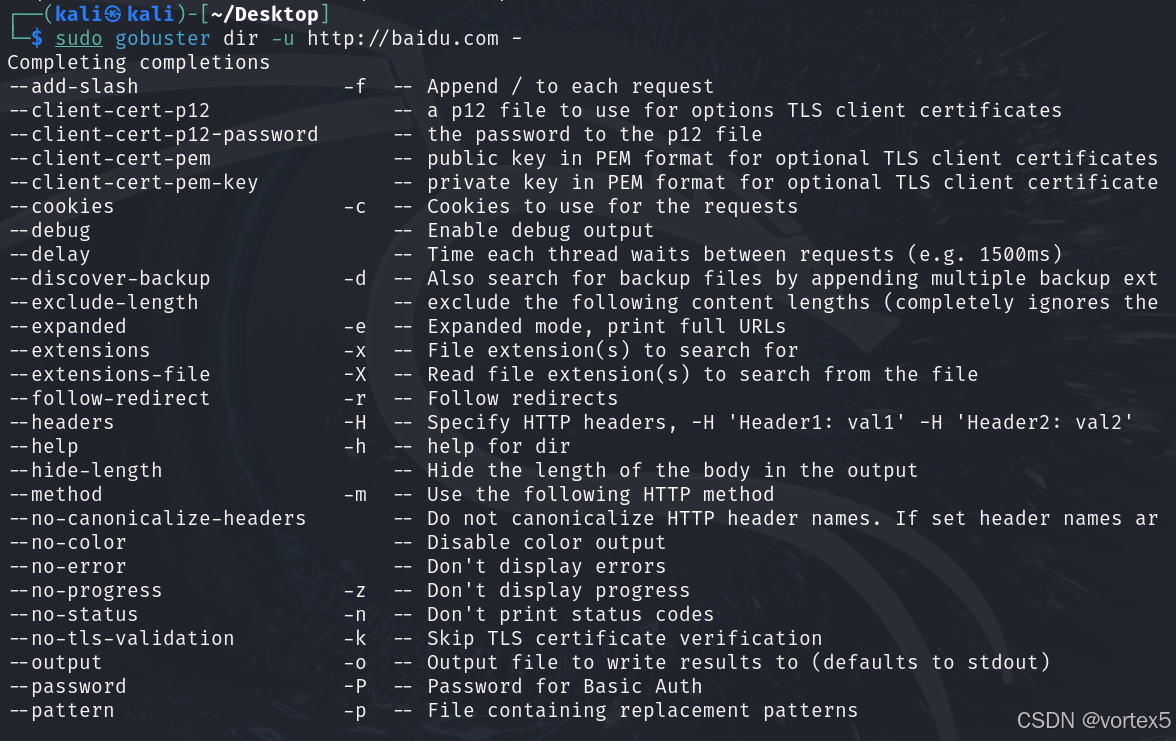
2. 补全选项
gobuster dir [Tab]会提示可用的选项,如下图:
四、总结
启用 gobuster 自动补全功能后,你将获得以下显著优势:
- 提升效率:无需记忆复杂的命令或选项名称,大幅缩短输入时间。
- 降低错误率:避免输入拼写错误或漏掉必需的参数。
- 动态提示:根据当前上下文提供精确的补全建议,操作更直观。
打靶时,掌握这一工具并将其融入日常工作流,能帮助你快人一步!
快速回顾:
- 生成自动补全脚本:
sudo gobuster completion zsh - 添加脚本到配置文件:
sudo gobuster completion zsh >> ~/.zshrc - 重新加载配置:
source ~/.zshrc
附录
Gobuster命令学习可参考下面文章:https://cloud.tencent.com/developer/article/2331391
原文 https://blog.csdn.net/2301_79518550/article/details/144177783